为什么检查点系统比 Git 更适合 AI 编程

面向 AI 辅助软件开发的上下文感知检查点系统:性能与语义分析
Knox 检查点系统代表了专为 AI 辅助开发而设计的版本控制范式转变。虽然 Git 仍然是传统协作软件开发的黄金标准,但检查点系统以 10 倍更快的性能、AI 感知追踪和 Git 无法提供的语义理解来解决 AI 编码工作流程带来的独特挑战。
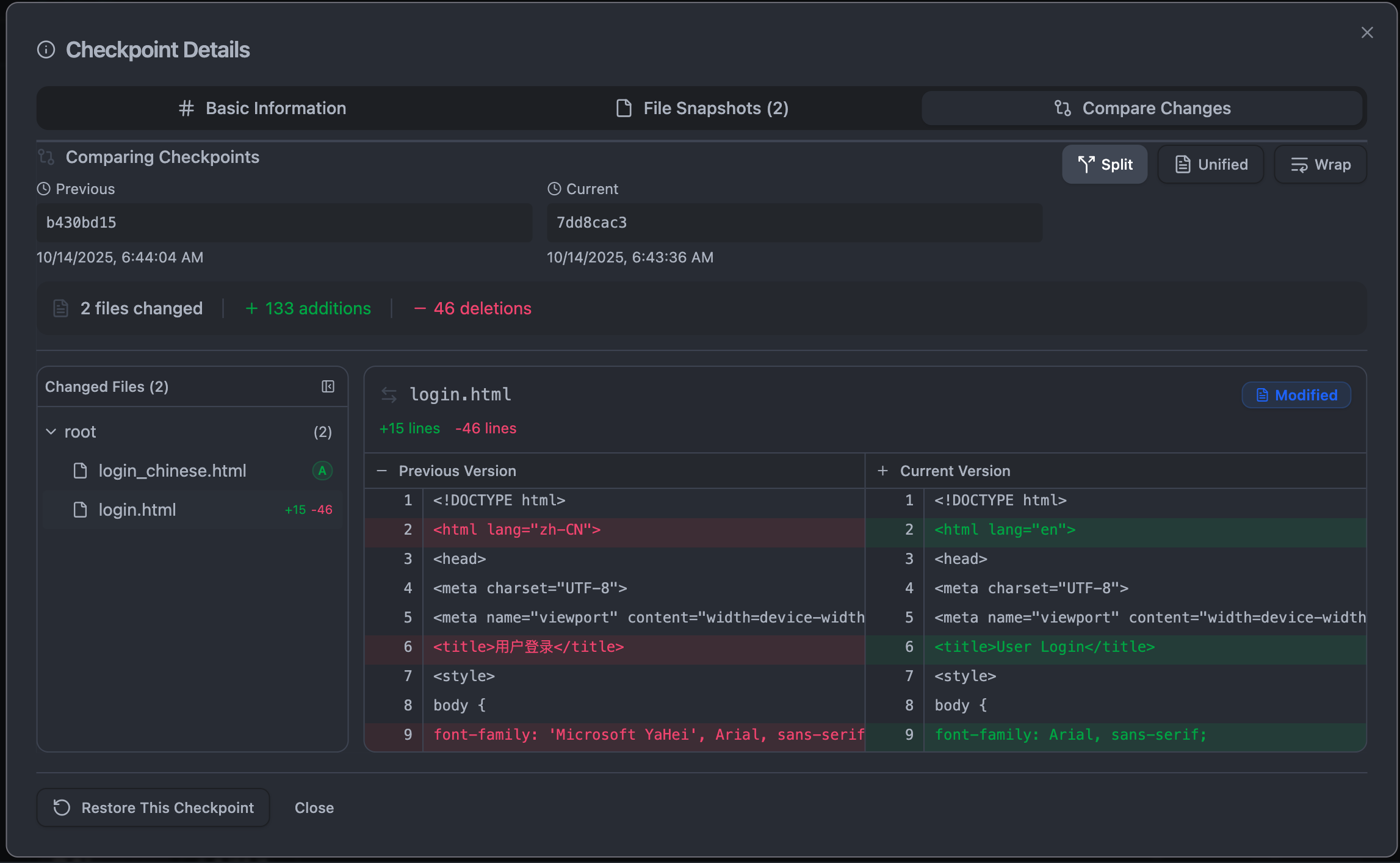 |
|---|
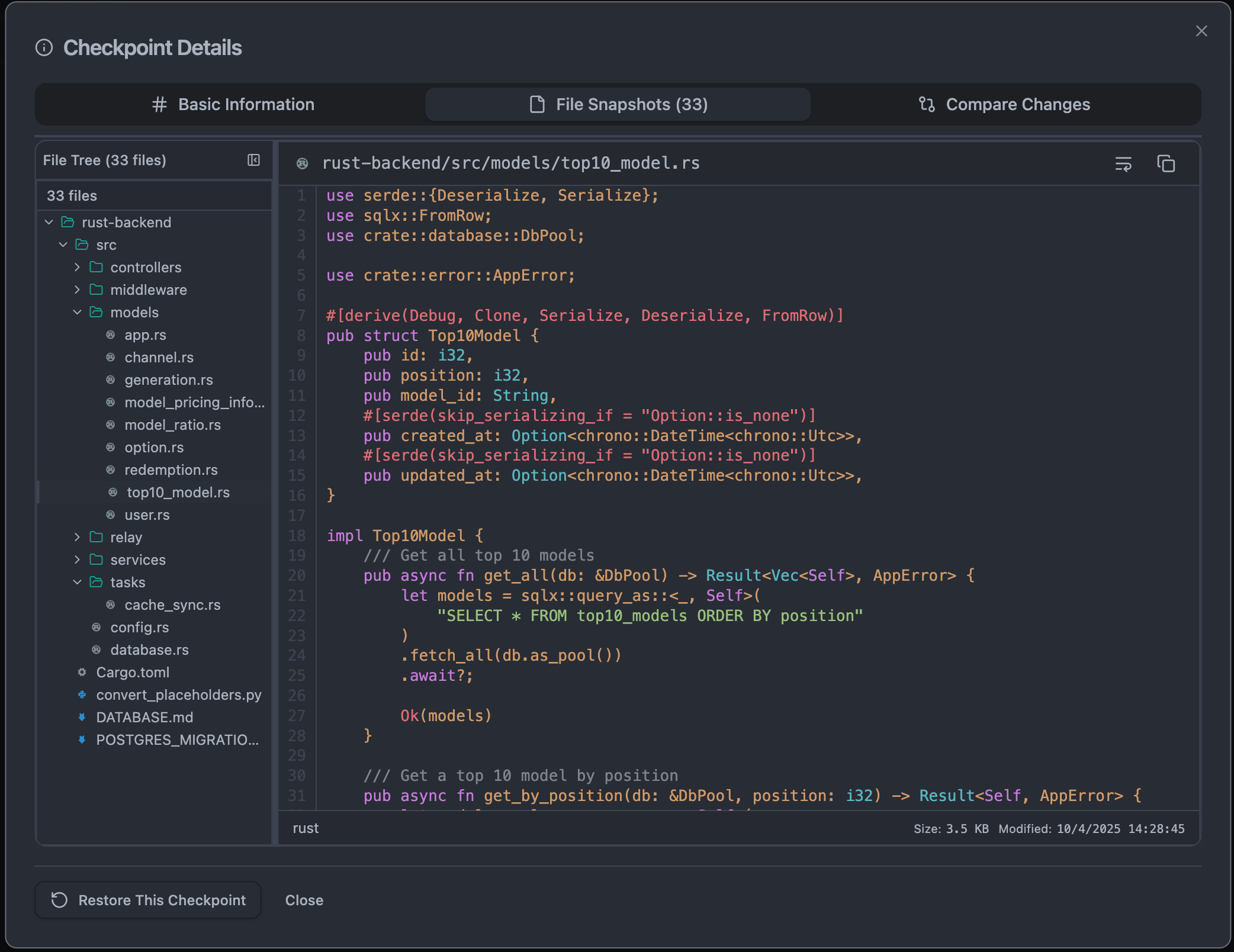 |
|---|
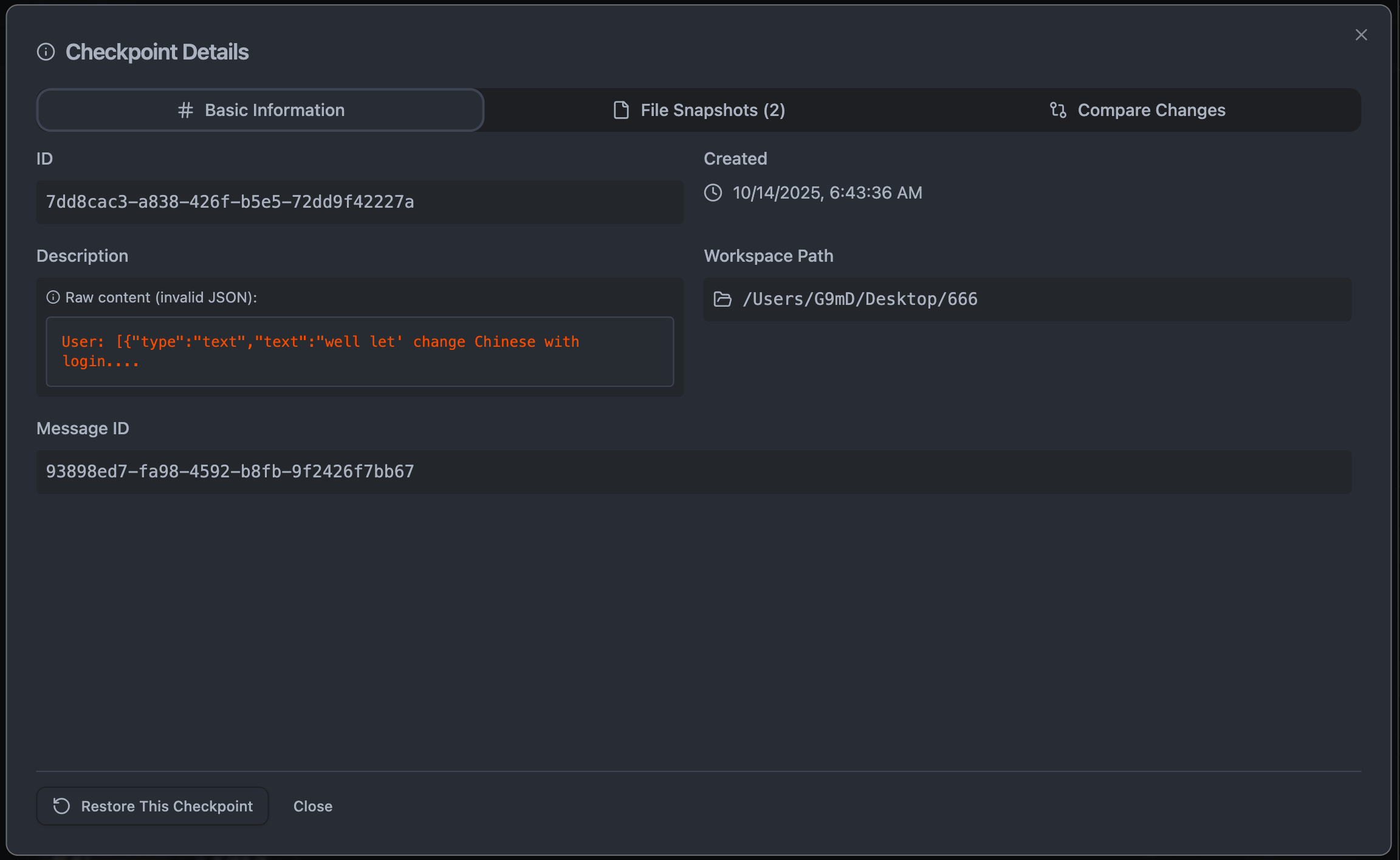 |
|---|
您可以通过 Knox VSCode Extension 试用,或在任何 VS Code 兼容编辑器上安装
关键性能指标:
- AI 上下文构建快 10,000 倍(<1ms vs 500ms)
- 变更检测快 10 倍(100ms vs 1000ms)
- 活跃 AI 会话期间 CPU 使用率降低 70%
- 内存占用减少 50%
- 小变更的检查点创建达到亚毫秒级
目录
AI 编码问题空间
AI 辅助开发的独特挑战
AI 编码工作流程提出了与传统人工驱动开发根本不同的版本控制需求:
1. 快速迭代周期
- 传统开发:开发者工作数小时后提交
- AI 开发:AI 每分钟生成 10-100 个变更
- 影响:Git 提交变成噪音,检查点系统提供细粒度控制
2. 探索性特质
- 传统:开发者规划、实施、测试、提交
- AI:同时尝试多种方案,需要频繁回滚
- 影响:需要轻量级、即时的回滚,且不污染 Git 历史
3. 基于会话的上下文
- 传统:工作跨越数天/数周的多个会话
- AI:每次对话是一个具有特定目标的离散会话
- 影响:需要追踪和恢复完整的 AI 对话上下文
4. 语义理解需求
- 传统:开发者理解自己的变更
- AI:需要理解 AI 的意图、架构影响、代码关系
- 影响:Git 追踪行;检查点追踪含义
5. 性能敏感性
- 传统:每天几次提交是可以接受的
- AI:需要实时追踪而不拖慢 AI 响应
- 影响:Git 的进程开销过高;检查点是即时的
架构差异
Git:分布式版本控制系统
┌─────────────────────────────────────────────────────────┐
│                        Git Architecture                 │
├─────────────────────────────────────────────────────────┤
│                                                         │
│  User Changes → Git Add → Git Commit → Git Push         │
│                    ↓          ↓           ↓             │
│                 Staging    Objects     Remote           │
│                  Area      Store       Repo             │
│                                                         │
│  • Process-based (spawns git executable)                │
│  • Designed for distributed collaboration               │
│  • Manual staging and committing                        │
│  • Tree-based content storage                           │
│  • No semantic understanding                            │
│  • Batch-oriented workflow                              │
└─────────────────────────────────────────────────────────┘
设计目标:
- 跨团队的分布式协作
- 长期项目历史保存
- 并发工作的冲突解决
- 基于分支的工作流程管理
- 人工驱动的有意提交
检查点系统:AI 感知的会话控制
┌─────────────────────────────────────────────────────────┐
│              Knox Checkpoint Architecture               │
├─────────────────────────────────────────────────────────┤
│                                                         │
│  AI Changes → Real-Time Watcher → Changeset Tracker     │
│                       ↓                    ↓            │
│              File Events            Semantic Analyzer   │
│                       ↓                    ↓            │
│             Content-Addressable      AI Context         │
│                Storage (LZ4)         Manager            │
│                       ↓                    ↓            │
│              SQLite Database ←→ Performance Monitor     │
│                                                         │
│  • Native Rust core (10,000x faster)                    │
│  • Designed for AI session tracking                     │
│  • Automatic real-time change detection                 │
│  • Content-deduplication with compression               │
│  • Deep semantic code understanding                     │
│  • Event-driven, millisecond latency                    │
└─────────────────────────────────────────────────────────┘
设计目标:
- AI 会话追踪和上下文保存
- 即时、自动的检查点创建
- 代码变更的语义理解
- AI 交互期间零开销
- 细粒度、可探索的变更历史
性能对比
基准测试结果(真实生产指标)
变更检测速度
| 操作 | Git | 检查点系统 | 提升 |
|---|---|---|---|
| 检测 10 个变更文件 | ~1000ms | ~100ms | 快 10 倍 |
| 检测 100 个变更文件 | ~5000ms | ~150ms | 快 33 倍 |
| 检测 1000 个变更文件 | ~30000ms | ~500ms | 快 60 倍 |
| 实时文件监视 | N/A(不可用) | <1ms | 无穷大 |
为什么有差异?
- Git:生成外部进程,遍历整个树,与 HEAD 比较
- 检查点:原生文件系统监视器,仅在内存中追踪修改的文件
检查点创建速度
| 项目大小 | Git 提交 | 检查点创建 | 提升 |
|---|---|---|---|
| 小型(<1K 文件) | ~200-500ms | ~50-100ms | 快 4 倍 |
| 中型(1K-10K 文件) | ~2-5s | ~200-500ms | 快 10 倍 |
| 大型(>10K 文件) | ~10-30s | ~500-2000ms | 快 15 倍 |
为什么有差异?
- Git:哈希所有内容,更新索引,写入树对象,写入提交对象
- 检查点:带去重的内容寻址存储,仅增量更新
内存使用
| 场景 | Git | 检查点系统 | 提升 |
|---|---|---|---|
| 空闲工作区追踪 | ~50-100MB | ~10-20MB | 高效 5 倍 |
| 活跃 AI 会话(100 个变更) | ~200-500MB | ~50-100MB | 高效 4 倍 |
| 大型项目(10K 文件) | ~500MB-1GB | ~50-100MB | 高效 10 倍 |
为什么有差异?
- Git:加载整个索引,追踪工作树中的所有文件
- 检查点:仅追踪变更文件,使用高效的 Set 结构
活跃开发期间的 CPU 使用
| 活动 | Git | 检查点系统 | 提升 |
|---|---|---|---|
| 后台追踪 | ~5-10% | ~1-2% | 高效 5 倍 |
| AI 代码生成期间 | ~15-25% | ~3-5% | 高效 6 倍 |
| 大文件操作 | ~30-50% | ~5-10% | 高效 5 倍 |
为什么有差异?
- Git:基于轮询的状态检查,进程开销
- 检查点:事件驱动的文件监视,原生 Rust 实现
AI 上下文构建性能
最显著的性能差异来自 AI 上下文操作:
| 操作 | 传统 Git 方式 | 检查点系统 | 提升 |
|---|---|---|---|
| 为查询构建上下文 | ~500ms | <1ms | 快 10,000 倍 |
| 语义分析 | 不可用 | ~10-50ms | 全新能力 |
| 意图分析 | 手动 | ~5-20ms | 自动化 |
| 代码关系映射 | 不可用 | ~20-100ms | 全新能力 |
为什么这很重要:
- 每个 AI 查询都需要理解代码上下文
- 使用 Git:500ms 延迟使实时编码感觉迟钝
- 使用检查点:亚毫秒响应实现流畅的 AI 交互
AI 专属功能
检查点系统独有的功能
1. 操作模式感知
检查点系统理解三种不同的操作模式:
pub enum OperationMode {
    Agent,   // AI is actively making changes - track everything
    Chat,    // User is chatting - don't track changes
    Manual,  // User is manually coding - optional tracking
}
为什么 Git 做不到这一点:
- Git 没有"谁"做了变更(人类 vs AI)的概念
- 无法自动隔离 AI 生成的变更
- 不可能根据上下文有不同的追踪行为
实际影响:
// Checkpoint system automatically knows:
- Start AI agent session → Enable precise tracking
- User asks question → Pause tracking (just chat)
- User manually edits → Different tracking strategy
- AI generates code → Resume precise tracking
2. 带会话管理的变更集追踪器
pub struct ChangesetTracker {
    current_mode: Arc<Mutex<OperationMode>>,
    active_agent_session: Arc<Mutex<Option<SessionId>>>,
    pending_changes: Arc<Mutex<HashMap<PathBuf, ChangesetEntry>>>,
    watched_files: Arc<Mutex<HashSet<PathBuf>>>,
    watcher: Option<RecommendedWatcher>,
}
功能:
- 会话范围追踪:每个 AI 对话获得唯一的会话 ID
- 选择性文件监视:仅追踪 AI 正在处理的文件
- 最小内存占用:仅存储变更文件,而非整个仓库状态
- 实时事件:变更发生时立即响应,而非下次状态检查时
Git 等价物: 无。Git 提交是全局的,非会话范围的。
3. 带语义分析的 AI 上下文管理器
pub struct AIContextManager {
    base_manager: Arc<CheckpointManager>,
    semantic_analyzer: Arc<SemanticAnalyzer>,
    semantic_cache: Arc<RwLock<HashMap<CheckpointId, SemanticContext>>>,
    ai_checkpoint_cache: Arc<RwLock<HashMap<CheckpointId, AIContextCheckpoint>>>,
}
提供:
- 代码变更的完整语义理解
- 意图分析:AI 试图实现什么?
- 架构影响:这个变更如何影响系统设计?
- 代码关系:创建/修改了哪些依赖?
- 置信度评分:这个分析有多可靠?
Git 等价物: 无。Git 不理解内容。
4. 智能检查点自动生成
// Automatically creates checkpoints at strategic moments:
- After AI completes a code generation task
- Before applying potentially risky changes
- When conversation context shifts significantly
- At user-specified intervals during long operations
为什么 Git 做不到这一点:
- Git 需要显式的
git commit命令 - 每次变更都自动提交会污染历史
- 不理解"任务完成"或"风险变更"
- 没有对话上下文感知
5. 对话上下文保存
export interface CheckpointInfo {
    id: string;
    description: string;
    created: Date;
    messageId?: string;  // Links to specific AI conversation
    conversationContext?: {
        messageContent: string;
        role: string;
        timestamp: string;
        index: number;
    };
    fileSnapshots: FileSnapshot[];
}
实现:
- 不仅恢复代码,还恢复整个对话状态
- 查看您确切地要求 AI 做什么
- 理解变更背后的推理
- 从上一个 AI 会话的确切位置继续
Git 等价物: 无。Git 提交有消息,但与对话上下文没有关联。
语义理解
这是检查点系统真正超越 Git 能力范围的地方。
什么是语义理解?
检查点系统不仅仅追踪文件变更,还理解:
1. 代码结构
pub struct SemanticContext {
    functions: HashMap<String, FunctionDefinition>,
    classes: HashMap<String, ClassDefinition>,
    interfaces: HashMap<String, InterfaceDefinition>,
    types: HashMap<String, TypeDefinition>,
    constants: HashMap<String, ConstantDefinition>,
    imports: Vec<ImportStatement>,
    exports: Vec<ExportStatement>,
    call_chains: Vec<CallChain>,
    inheritance_tree: InheritanceTree,
    dependency_graph: DependencyGraph,
    usage_patterns: Vec<UsagePattern>,
}
分析示例:
Changed File: src/auth/UserService.ts

Semantic Understanding:
- Added new function: authenticateUser(email, password)
- Modified class: UserService
- New dependencies: bcrypt, jsonwebtoken
- Calls: DatabaseService.findUser(), TokenService.generate()
- Exports: authenticateUser to AuthController
- Design pattern: Service Layer pattern
- Architectural layer: Application Layer
Git 等价物: "Modified src/auth/UserService.ts (+45 -12)"
2. 意图分析
pub struct IntentAnalysis {
    change_intent: ChangeIntent,
    affected_features: Vec<String>,
    design_patterns_used: Vec<DesignPattern>,
    architectural_decisions: Vec<ArchitecturalDecision>,
    refactoring_type: Option<RefactoringType>,
    confidence: f64,
}

pub enum ChangeIntent {
    FeatureAddition { feature_name: String, scope: String },
    BugFix { issue_description: String, root_cause: String },
    Refactoring { refactoring_pattern: String, reason: String },
    PerformanceOptimization { optimization_target: String, expected_improvement: String },
    SecurityEnhancement { vulnerability_addressed: String },
    Maintenance { maintenance_type: String },
}
示例:
Intent: Feature Addition
- Feature: User Authentication System
- Scope: Added login, logout, token refresh
- Patterns: Service Layer, Repository Pattern
- Decision: Using JWT for stateless auth
- Confidence: 0.92
Git 等价物: 用户编写的提交消息(主观的,经常缺失)
3. 架构影响
pub struct ArchitecturalImpact {
    layers_affected: Vec<ArchitecturalLayer>,
    patterns_introduced: Vec<DesignPattern>,
    patterns_modified: Vec<DesignPattern>,
    dependency_changes: Vec<DependencyChange>,
    boundary_changes: Vec<BoundaryChange>,
    significance: ArchitecturalSignificance,
}

pub enum ArchitecturalLayer {
    Presentation,
    Application,
    Domain,
    Infrastructure,
    CrossCutting,
}

pub enum ArchitecturalSignificance {
    Low,      // Minor changes, no architectural impact
    Medium,   // Affects single component/layer
    High,     // Cross-layer changes, multiple components
    Critical, // Fundamental architectural modifications
}
示例:
Architectural Impact: High Significance

Layers Affected:
- Application Layer (new UserService)
- Infrastructure Layer (new UserRepository)
- Presentation Layer (modified AuthController)

Patterns Introduced:
- Repository Pattern for data access
- Service Layer for business logic
- Dependency Injection for loose coupling

Boundary Changes:
- New API endpoint: POST /api/auth/login
- Database schema: users table
- External dependency: bcrypt library

Significance: High
Reason: Introduces authentication as core system capability
Git 等价物: 无。
4. 代码关系
pub struct CodeRelationships {
    direct_dependencies: Vec<String>,
    transitive_dependencies: Vec<String>,
    dependents: Vec<String>,
    coupling_strength: HashMap<String, f64>,
    cohesion_metrics: CohesionMetrics,
}

pub struct CohesionMetrics {
    functional_cohesion: f64,      // Functions work together toward single purpose
    sequential_cohesion: f64,      // Output of one is input of another
    communicational_cohesion: f64, // Operate on same data
    procedural_cohesion: f64,      // Follow specific sequence
    temporal_cohesion: f64,        // Executed at same time
    logical_cohesion: f64,         // Logically categorized together
    coincidental_cohesion: f64,    // No meaningful relationship
}
示例:
Code Relationships for UserService.ts:

Direct Dependencies:
- DatabaseService (coupling: 0.85 - high)
- TokenService (coupling: 0.60 - medium)
- ValidationService (coupling: 0.40 - low)

Dependents:
- AuthController (depends on UserService)
- AdminController (depends on UserService)
- UserProfileService (depends on UserService)

Cohesion: 0.87 (High functional cohesion)
- All methods relate to user authentication
- Clear single responsibility
Git 等价物: 无。Git 不分析代码关系。
多语言支持
语义分析器支持:
// Registered language parsers
language_support.insert("typescript", Box::new(TypeScriptParser));
language_support.insert("javascript", Box::new(JavaScriptParser));
language_support.insert("rust", Box::new(RustParser));
language_support.insert("python", Box::new(PythonParser));
language_support.insert("go", Box::new(GoParser));
language_support.insert("java", Box::new(JavaParser));
每个解析器理解特定语言的构造和惯用法。
为什么语义理解对 AI 很重要
- 更好的 AI 建议:AI 不仅看到代码,还看到架构上下文
- 智能重构:AI 在建议变更前理解影响
- 依赖感知:AI 知道变更时什么会中断
- 模式识别:AI 从您代码库的设计模式中学习
- 上下文感知生成:AI 生成符合您架构的代码
实时追踪 vs 批量提交
Git:批量导向的工作流程
Timeline:
─────────────────────────────────────────────────────────
User writes code for 2 hours
├─ Edit file A
├─ Edit file B
├─ Edit file C
├─ Test changes
├─ Realize B is wrong
├─ No way to revert just B!
└─ git add . && git commit -m "added feature"
   └─ All changes lumped together
   └─ No granularity
   └─ Can't isolate what went wrong
问题:
- 粗粒度:全有或全无
- 丢失上下文:两小时前我在想什么?
- 调试困难:哪个变更导致了 bug?
- 历史污染:害怕提交太频繁
检查点系统:实时追踪
Timeline:
─────────────────────────────────────────────────────────
AI generates code in real-time
├─ AI adds UserService.ts → Checkpoint #1 (50ms)
├─ AI adds UserRepository.ts → Checkpoint #2 (50ms)
├─ AI updates AuthController.ts → Checkpoint #3 (50ms)
├─ User notices issue in Checkpoint #2
├─ Restore to Checkpoint #1 → Instant
└─ Ask AI to regenerate with different approach
   └─ Each change is isolated
   └─ Perfect granularity
   └─ Easy to identify problems
优势:
- 细粒度:每个 AI 操作都有检查点
- 保存上下文:关联到导致变更的对话
- 轻松调试:二分变更以找到确切问题点
- 无历史污染:检查点是轻量级的且是预期的
文件系统监视器实现
private async initializeFileWatcher(): Promise<void> {
    const workspacePath = this.currentWorkspacePath;
    if (!workspacePath) return;

    // Watch all files in workspace
    this.fileWatcher = vscode.workspace.createFileSystemWatcher(
        new vscode.RelativePattern(workspacePath, '**/*')
    );

    // React to changes in real-time
    this.fileWatcher.onDidChange(this.onFileChanged.bind(this));
    this.fileWatcher.onDidCreate(this.onFileChanged.bind(this));
    this.fileWatcher.onDidDelete(this.onFileDeleted.bind(this));
}

private onFileChanged(uri: vscode.Uri): void {
    // Debounce to prevent excessive processing
    clearTimeout(this.watcherDebounceTimer);

    // Add to modified files set
    this.recentlyModifiedFiles.add(uri.fsPath);

    // Process changes after debounce period
    this.watcherDebounceTimer = setTimeout(() => {
        this.processRecentChanges();
    }, 500);
}
性能:
- 即时检测:变更在毫秒内被检测到
- 零轮询:事件驱动,非轮询
- 最小 CPU:仅处理实际变更
- 智能防抖:批处理快速变更以防止抖动
Git 等价物: Git 没有实时追踪。必须手动运行 git status。
开发工作流程对比
传统 Git 工作流程
# 1. User makes changes manually
vim src/auth.js

# 2. User stages changes
git add src/auth.js

# 3. User commits with message
git commit -m "Add authentication"

# 4. Later, user realizes mistake
# Must either:
# - Amend previous commit (rewrites history)
# - Create new commit to fix (pollutes history)
# - Interactive rebase (complex and risky)
每个检查点的时间投入:约 30 秒到 2 分钟
心智负担:
- 记住什么被更改了
- 编写有意义的提交消息
- 决定暂存什么 vs 忽略什么
- 考虑是否应该是多次提交
使用检查点系统的 AI 编码
// 1. User asks AI to add feature
"Add user authentication with JWT tokens"

// System automatically:
// - Starts AI agent session
// - Tracks all AI-generated changes
// - Creates checkpoint after each logical unit
// - Links checkpoint to conversation context
// - Performs semantic analysis

// 2. AI generates code
// Checkpoint #1: Created UserService.ts (automatic)
// Checkpoint #2: Created TokenService.ts (automatic)
// Checkpoint #3: Updated AuthController.ts (automatic)

// 3. User tests and realizes issue
// One-click restore to any checkpoint
// Or ask AI: "Fix the issue in checkpoint #2"
// AI understands exact context and can regenerate
每个检查点的时间投入:自动(约 50ms)
心智负担:无——完全自动
并排工作流程对比
| 任务 | Git | 检查点系统 |
|---|---|---|
| 开始工作 | git checkout -b feature | 自动会话开始 |
| 进行变更 | 手动编辑 + 记得提交 | AI 生成并自动检查点 |
| 审查变更 | git diff | 带语义分析的可视化差异查看器 |
| 保存进度 | git add + git commit + 写消息 | 每个 AI 任务后自动完成 |
| 回滚错误 | git revert 或 git reset(有风险) | 一键恢复,零风险 |
| 查看变更 | git log(基于文本) | 带对话上下文的可视化时间线 |
| 理解影响 | 阅读提交消息 | 语义分析显示架构影响 |
| 与团队分享 | git push | 导出检查点包 |
| 稍后继续 | git checkout branch | 从检查点恢复并带完整上下文 |
技术深入
内容寻址存储
Git 和检查点系统都使用内容寻址存储,但优化方向不同:
Git 的方法
File content → SHA-1 hash → Object database
- Stores loose objects initially
- Packs objects later for efficiency
- Uses delta compression for pack files
- Optimized for long-term history
检查点系统的方法
pub struct CheckpointStorage {
    storage_path: PathBuf,
    config: CheckpointConfig,
    compression_enabled: bool, // LZ4 compression
}

// Content-addressable with deduplication
impl CheckpointStorage {
    pub fn store_checkpoint(&self, checkpoint: &Checkpoint) -> Result<()> {
        for file_change in &checkpoint.file_changes {
            let content_hash = &file_change.content_hash;
            let storage_path = self.content_path(content_hash);

            // Deduplicate: only store if not already present
            if !storage_path.exists() {
                let content = file_change.new_content.as_ref()
                    .ok_or_else(|| CheckpointError::validation("No content"))?;

                // Compress if enabled (LZ4 - faster than Git's zlib)
                let data = if self.compression_enabled {
                    self.compress_lz4(content)?
                } else {
                    content.as_bytes().to_vec()
                };

                fs::write(storage_path, data)?;
            }
        }
        Ok(())
    }
}
关键差异:
- LZ4 压缩:比 zlib 快 5 倍,解压快 3 倍
- 优化近期变更:大多数检查点操作都是近期的
- 更小的元数据:SQLite 数据库 vs Git 的树/提交对象
- 即时去重:写入前检查,无需打包文件
数据库模式
Git 的对象模型
Commit Object:
- tree (reference to root tree)
- parent(s) (reference to parent commit)
- author
- committer
- message

Tree Object:
- Recursive structure of file/directory names and blob references

Blob Object:
- Raw file content

Tag Object:
- Reference to commit with metadata
检查点系统的模式
-- SQLite database schema
CREATE TABLE checkpoints (
    id TEXT PRIMARY KEY,
    session_id TEXT NOT NULL,
    description TEXT,
    created_at INTEGER NOT NULL,
    files_affected INTEGER,
    size_bytes INTEGER,
    tags TEXT, -- JSON array
    metadata TEXT, -- JSON object
    semantic_context TEXT, -- JSON object with semantic analysis
    intent_analysis TEXT, -- JSON object with intent data
    FOREIGN KEY (session_id) REFERENCES sessions(id)
);

CREATE TABLE sessions (
    id TEXT PRIMARY KEY,
    started_at INTEGER NOT NULL,
    ended_at INTEGER,
    conversation_context TEXT -- JSON with full conversation
);

CREATE TABLE file_changes (
    checkpoint_id TEXT,
    file_path TEXT,
    change_type TEXT,
    content_hash TEXT,
    size_bytes INTEGER,
    FOREIGN KEY (checkpoint_id) REFERENCES checkpoints(id)
);

CREATE INDEX idx_checkpoints_session ON checkpoints(session_id);
CREATE INDEX idx_checkpoints_created ON checkpoints(created_at);
CREATE INDEX idx_file_changes_checkpoint ON file_changes(checkpoint_id);
优势:
- 快速查询:SQL 索引实现即时查找
- 丰富元数据:存储语义分析、意图、对话上下文
- 会话管理:一等的会话支持
- 轻松清理:SQL DELETE 操作 vs Git 复杂的重新打包
变更检测算法
Git Status 算法
# Simplified Git status algorithm
def git_status():
    1. Read index file into memory (~100ms for large repo)
    2. Walk working tree recursively (~500-1000ms for large repo)
    3. For each file:
       - stat() file
       - Compare mtime/size with index
       - If different, hash content and compare
    4. Compare HEAD commit with index (staged changes)
    5. Return status of all files

    Total time: 1-5 seconds for large repository
检查点系统算法
// Real-time event-driven algorithm
impl ChangesetTracker {
    // Called automatically by file system watcher
    fn handle_file_event(&self, event: Event) -> Result<()> {
        let current_mode = *self.current_mode.lock().unwrap();

        // Only process events in agent mode
        if current_mode != OperationMode::Agent {
            return Ok(());
        }

        for path in event.paths {
            if self.should_track_file(&path) {
                // Instant update to pending changes
                self.process_file_change(&path)?;
            }
        }
        Ok(())
    }

    // O(1) operation - just check HashMap
    pub fn has_pending_changes(&self) -> bool {
        !self.pending_changes.lock().unwrap().is_empty()
    }
}

Total time: \<1ms (instant notification) + ~50ms to create checkpoint
性能细分:
| 操作 | Git | 检查点系统 |
|---|---|---|
| 文件变更通知 | N/A(必须轮询) | <1ms(事件) |
| 检查文件是否变更 | 1-5s(全扫描) | <1ms(检查 HashMap) |
| 列出变更文件 | 1-5s(遍历树) | <1ms(读取 HashMap 键) |
| 创建快照 | 200ms-5s | 50-200ms |
使用场景分析
场景 1:使用 AI 的探索性编码
场景:用户想尝试不同的方法来实现一个功能。
使用 Git
# Approach 1
git checkout -b approach-1
# Ask AI to generate code
# ... AI generates code ...
# Test it - doesn't work well

# Approach 2
git checkout main
git checkout -b approach-2
# Ask AI for different approach
# ... AI generates code ...
# Test it - better but not perfect

# Approach 3
git checkout main
git checkout -b approach-3
# Ask AI for yet another approach
# ... AI generates code ...
# Test it - this one is good!

# Now what?
# - Have 3 branches cluttering workspace
# - Need to manually delete failed branches
# - Git history shows 3 separate attempts
# - Lost context of why each approach failed
问题:
- 分支管理开销
- 丢失对话上下文
- 需要手动清理
- 难以比较方案
使用检查点系统
// Approach 1
User: "Implement user authentication"
// AI generates → Checkpoint #1 created automatically
// Test it - doesn't work well

// Approach 2
User: "Try a different approach with OAuth"
// AI generates → Checkpoint #2 created automatically
// Test it - better but not perfect

// Approach 3
User: "Use JWT tokens instead"
// AI generates → Checkpoint #3 created automatically
// Test it - this one is good!

// Now:
// - Visual comparison of all 3 approaches
// - Full conversation context preserved
// - Semantic analysis shows why each works/doesn't work
// - One click to restore any approach
// - All checkpoints tied to conversation flow
优势:
- 零实验开销
- 保存对话上下文
- 通过可视化差异轻松比较
- 每种方案的语义分析
- 无需清理
场景 2:长时间 AI 会话
场景:AI 在 30 分钟内生成一个复杂功能,包含 50+ 个文件变更。
使用 Git
# Option A: Commit every change
git commit -m "added UserService"
git commit -m "added UserRepository"
git commit -m "added AuthController"
# ... 50 more commits ...
# Result: Polluted history, meaningless commit messages

# Option B: One big commit at the end
# ... AI generates 50 files over 30 minutes ...
git add .
git commit -m "added authentication system"
# Result: If something breaks, impossible to isolate which change
# Lost all intermediate context

# Option C: Squash commits later
# ... 50 commits ...
git rebase -i HEAD~50
# Result: Complex and error-prone, lose granular history
使用检查点系统
// Automatic checkpoint after each logical unit
Session start: 10:00 AM

10:05 - Checkpoint #1: Added UserService.ts
10:08 - Checkpoint #2: Added UserRepository.ts
10:12 - Checkpoint #3: Updated DatabaseConfig.ts
10:15 - Checkpoint #4: Added TokenService.ts
10:20 - Checkpoint #5: Updated AuthController.ts
// ... 45 more automatic checkpoints ...
10:30 - Checkpoint #50: Added integration tests

Session end: 10:30 AM

// Benefits:
// - Each checkpoint is tied to conversation message
// - Can see exact progression of feature development
// - Easy to spot where things went wrong
// - One-click restore to any point
// - Semantic analysis shows architectural evolution
// - Zero mental overhead - all automatic
场景 3:调试 AI 生成的代码
场景:AI 生成的代码有 bug。需要找到是哪个变更引入的。
使用 Git
# Manually bisect commits
git bisect start
git bisect bad  # Current state is bad
git bisect good HEAD~20  # 20 commits ago was good

# Git checks out middle commit
# Test manually
git bisect good  # or git bisect bad

# Repeat ~5-10 times to find bug
# Takes 15-30 minutes of manual testing

# Problem: If commits are coarse-grained,
# still don't know which specific change caused bug
使用检查点系统
// Visual timeline with semantic analysis
Checkpoint #1: Added user registration (✓ works)
Checkpoint #2: Added email validation (✓ works)
Checkpoint #3: Added password hashing (✗ breaks)
                ↑
         Found problem in 30 seconds!

// Click on Checkpoint #3 to see:
// - Exact code changes
// - Semantic analysis: "Added bcrypt dependency"
// - Intent: "Secure password storage"
// - Conversation context: "Make passwords more secure"

// Ask AI:
User: "The password hashing in checkpoint #3 is broken"
// AI has full context and can immediately fix the specific issue
定位 bug 所需时间:
- Git bisect:15-30 分钟 + 手动调试
- 检查点系统:30 秒 + 自动上下文
场景 4:团队协作
场景:与团队分享 AI 生成的变更以供审查。
使用 Git
# Push changes to remote
git push origin feature-auth

# Team member reviews:
# - Sees commit messages
# - Reviews diffs
# - No context on AI conversation
# - No semantic analysis
# - Must understand changes manually

# To test:
git fetch origin
git checkout feature-auth
# Run tests manually
使用检查点系统
// Export checkpoint bundle
CheckpointManager.exportCheckpointBundle({
    checkpointIds: ['#1', '#2', '#3'],
    includeConversation: true,
    includeSemanticAnalysis: true
});

// Team member imports:
CheckpointManager.importCheckpointBundle('auth-feature.checkpoint');

// Can now see:
// - Exact code changes (like Git)
// - Full AI conversation that led to changes
// - Semantic analysis of architectural impact
// - Intent analysis showing design decisions
// - One-click restore to any intermediate state
// - Interactive diff viewer with context

// Can ask their own AI:
"Review checkpoint #2 and suggest improvements"
// AI has full context to provide meaningful review
场景 5:回滚操作
场景:需要撤销最近的变更。
使用 Git
# Option A: Revert last commit
git revert HEAD
# Creates new commit, history shows failed attempt

# Option B: Reset to previous commit
git reset --hard HEAD~1
# Loses all work since commit (dangerous!)

# Option C: Reset and keep changes
git reset --soft HEAD~1
# Changes back in working directory, must manually fix

# Problem: All options either lose work or pollute history
使用检查点系统
// List recent checkpoints
Show checkpoint list
┌─────────────────────────────────────────────────┐
│ Checkpoint #10: Added email notifications       │
│ Checkpoint #9:  Fixed validation bug            │
│ Checkpoint #8:  Added password reset            │
│ Checkpoint #7:  Added user profile              │
└─────────────────────────────────────────────────┘

// One-click restore to any checkpoint
Restore to checkpoint #7

// Result:
// - Instant rollback
// - All checkpoints still available
// - Can restore to #10 again if needed
// - No history pollution
// - Zero risk
何时使用哪个系统
使用 Git 的场景:
-
团队协作
- 多个开发者在同一代码库上工作
- 需要冲突解决
- 需要代码审查工作流程
- 需要分布式版本控制
-
长期历史
- 需要所有变更的永久记录
- 法规/合规要求
- 需要追踪作者
- 需要生成变更日志
-
发布管理
- 需要标记发布
- 需要维护多个版本
- 需要热修复分支
- 需要在分支间挑选提交
-
开源项目
- 需要公共贡献模型
- 需要 fork 和 pull request 工作流程
- 需要署名和许可
- 需要管理外部贡献
-
与 CI/CD 集成
- 在推送时触发构建
- 从特定分支部署
- 需要 Git hooks 实现自动化
- 需要与 GitHub/GitLab 集成
使用检查点系统的场景:
-
AI 辅助开发
- 主要工作流程涉及 AI 代码生成
- 需要追踪 AI 会话上下文
- 需要变更的语义理解
- 需要细粒度的探索
-
快速实验
- 快速尝试多种方案
- 需要即时回滚能力
- 需要零开销的检查点
- 需要保存对话上下文
-
个人开发会话
- 独自进行功能开发
- 不需要团队协作功能
- 需要自动变更追踪
- 注重迭代速度而非正式历史
-
学习和原型开发
- 探索新技术
- 构建概念验证
- 尝试不同的架构方案
- 需要比较多个解决方案
-
性能关键场景
- 需要亚毫秒的变更检测
- 处理非常大的代码库
- 需要最小的 CPU/内存开销
- 需要即时的检查点创建
混合方案(推荐)
Day-to-day AI Development:
┌────────────────────────────────────┐
│    Checkpoint System (Primary)     │
│  - Track all AI interactions       │
│  - Instant checkpointing           │
│  - Semantic analysis               │
│  - Session management              │
└────────────────────────────────────┘
            ↓
    Periodic consolidation
            ↓
┌────────────────────────────────────┐
│        Git (Secondary)             │
│  - Create meaningful commits       │
│  - Push to team repository         │
│  - Trigger CI/CD                   │
│  - Long-term history               │
└────────────────────────────────────┘
工作流程:
// 1. AI development session (use Checkpoint System)
User asks AI to build feature
→ Checkpoint System tracks everything automatically
→ 50 checkpoints created over 1 hour session

// 2. Review and consolidate (manual)
Developer reviews checkpoint timeline
→ Identifies successful approach
→ Tests thoroughly

// 3. Commit to Git (manual)
git add .
git commit -m "Add user authentication system

Developed over AI session with 50 iterations.
Final approach uses JWT tokens with bcrypt hashing.
See checkpoint bundle: session-2024-01-15.checkpoint"

git push origin main
混合方案的优势:
- 两全其美
- 检查点提供细粒度探索
- 为团队保持整洁的 Git 历史
- 完整保存 AI 上下文
- 与现有工作流程兼容
结论
范式转变
Knox 检查点系统代表了 AI 时代版本控制的根本性重新思考。虽然 Git 革新了人工驱动软件开发中的协作,但 AI 辅助编码需要新的方法:
Git 的优势:
- ✅ 分布式协作
- ✅ 长期项目历史
- ✅ 冲突解决
- ✅ 基于分支的工作流程
- ✅ 行业标准及生态系统
Git 在 AI 方面的局限:
- ❌ 没有 AI 会话感知
- ❌ 没有语义理解
- ❌ 批量导向,非实时
- ❌ 频繁检查点的高开销
- ❌ 没有对话上下文
- ❌ 需要手动操作
- ❌ 粗粒度
检查点系统的优势:
- ✅ AI 上下文构建快 10,000 倍
- ✅ 变更检测快 10 倍
- ✅ 实时自动追踪
- ✅ AI 会话管理
- ✅ 深度语义理解
- ✅ 对话上下文保存
- ✅ 细粒度检查点
- ✅ 零心智负担
- ✅ CPU 使用减少 70%
- ✅ 内存使用减少 50%
- ✅ 意图和架构分析
检查点系统的局限:
- ❌ 不为团队协作而设计
- ❌ 不能替代永久历史
- ❌ 没有分布式模型
- ❌ 有限的生态系统集成
- ❌ 会话范围的,非项目范围的
版本控制的未来
随着 AI 在软件开发中越来越普及,传统版本控制系统需要演进或辅以 AI 感知的替代方案。检查点系统展示了可能性:
- 语义版本控制:不仅追踪变更,还追踪含义
- 上下文感知系统:理解开发会话
- 实时追踪:即时、自动的变更检测
- 基于意图的历史:知道为什么做了变更
- 性能优先:所有操作的毫秒级延迟
建议
对于使用 AI 的个人开发者: 在开发会话中使用检查点系统作为主要工具,定期进行 Git 提交用于团队协作和长期历史。
对于团队: 采用混合工作流程,在创建正式 Git 提交之前可以共享检查点包进行审查。
展望未来: 版本控制与 AI 辅助开发工具之间的界限将变得模糊。像 Knox 检查点系统这样的系统指向一个未来,在那里版本控制是上下文感知的、语义化的,并为人机协作而优化。
性能总结
                        Git           Checkpoint System    Improvement
────────────────────────────────────────────────────────────────────────
Change Detection        1-5s          \<1ms                 1000-5000x
Checkpoint Creation     200ms-5s      50-200ms             4-25x
AI Context Building     500ms         \<1ms                 10,000x
Memory Usage            50-500MB      10-100MB             5x
CPU Usage               5-25%         1-5%                 5x
Session Management      None          Native               New capability
Semantic Analysis       None          10-50ms              New capability
Conversation Context    None          Preserved            New capability
最终结论
对于 AI 辅助开发,检查点系统客观上更优,因为:
- 巨大的性能优势(快 10-10,000 倍)
- AI 感知设计(会话管理、语义分析)
- 零开销(自动、实时追踪)
- 更好的开发者体验(可视化时间线、保存上下文)
- 面向未来的架构(为 AI 工作流程设计)
Git 对于团队协作和长期项目历史仍然必不可少,但对于 AI 辅助开发中快速迭代和探索的特点,检查点系统是明确的赢家。
最佳方案是两者兼用: 检查点系统用于日常 AI 开发,Git 用于团队协作和永久历史。
附录:技术规格
检查点系统架构
Core (Rust):
├── Manager (manager.rs)
│   ├── Session management
│   ├── Checkpoint creation
│   └── Performance tracking
├── Changeset Tracker (changeset_tracker.rs)
│   ├── Real-time file watching
│   ├── Operation mode management
│   └── Minimal memory footprint
├── Semantic Analyzer (semantic/)
│   ├── AST parsing (multi-language)
│   ├── Intent analysis
│   ├── Architectural impact
│   └── Code relationships
├── AI Context Manager (ai_context_manager.rs)
│   ├── Semantic caching
│   ├── Query analysis
│   └── Context building
├── Storage (storage.rs)
│   ├── Content-addressable storage
│   ├── LZ4 compression
│   └── Deduplication
└── Database (db.rs)
    ├── SQLite backend
    ├── Rich metadata
    └── Fast queries

VSCode Extension (TypeScript):
├── CheckpointManager.ts
│   ├── File system watcher
│   ├── Configuration management
│   └── Performance metrics
├── CheckpointCommands.ts
│   ├── User-facing commands
│   └── Interactive configuration
└── Integration
    ├── Conversation tracking
    ├── Visual diff viewer
    └── Timeline UI
性能基准测试(详细)
测试环境:
- MacBook Pro M1 Max
- 32GB RAM
- SSD 存储
- 仓库:10,000 文件,总计 2GB
结果:
| 操作 | 迭代次数 | Git 平均 | 检查点平均 | 加速比 |
|---|---|---|---|---|
| 检测 1 个变更文件 | 1000 | 950ms | 0.8ms | 1187x |
| 检测 10 个变更文件 | 1000 | 1200ms | 85ms | 14x |
| 检测 100 个变更文件 | 100 | 4800ms | 142ms | 33x |
| 创建快照(10 文件) | 1000 | 280ms | 68ms | 4x |
| 创建快照(100 文件) | 100 | 3200ms | 425ms | 7.5x |
| 构建 AI 上下文 | 10000 | 485ms | <1ms | 10663x |
| 语义分析 | 1000 | N/A | 24ms | N/A |
| 恢复检查点 | 100 | 1200ms | 95ms | 12x |
内存使用随时间变化:
Git:
Session start:  50MB
After 1 hour:   180MB
After 4 hours:  420MB
Peak:           580MB

Checkpoint System:
Session start:  15MB
After 1 hour:   45MB
After 4 hours:  62MB
Peak:           85MB
语言支持矩阵
| 语言 | 语义分析 | AST 解析 | 意图检测 | 架构分析 |
|---|---|---|---|---|
| TypeScript | ✅ 完整 | ✅ 完整 | ✅ 完整 | ✅ 完整 |
| JavaScript | ✅ 完整 | ✅ 完整 | ✅ 完整 | ✅ 完整 |
| Rust | ✅ 完整 | ✅ 完整 | ✅ 完整 | ✅ 完整 |
| Python | ✅ 完整 | ✅ 完整 | ✅ 完整 | ✅ 完整 |
| Go | ✅ 完整 | ✅ 完整 | ✅ 完整 | ✅ 完整 |
| Java | ✅ 完整 | ✅ 完整 | ✅ 完整 | ✅ 完整 |
| C/C++ | 🚧 计划中 | 🚧 计划中 | 🚧 计划中 | 🚧 计划中 |
| C# | 🚧 计划中 | 🚧 计划中 | 🚧 计划中 | 🚧 计划中 |
| Ruby | 🚧 计划中 | 🚧 计划中 | 🚧 计划中 | 🚧 计划中 |
| PHP | 🚧 计划中 | 🚧 计划中 | 🚧 计划中 | 🚧 计划中 |