KnoxChat VSCode Extension — TODO

Todo/Task Management System — AI-Powered Task Orchestration
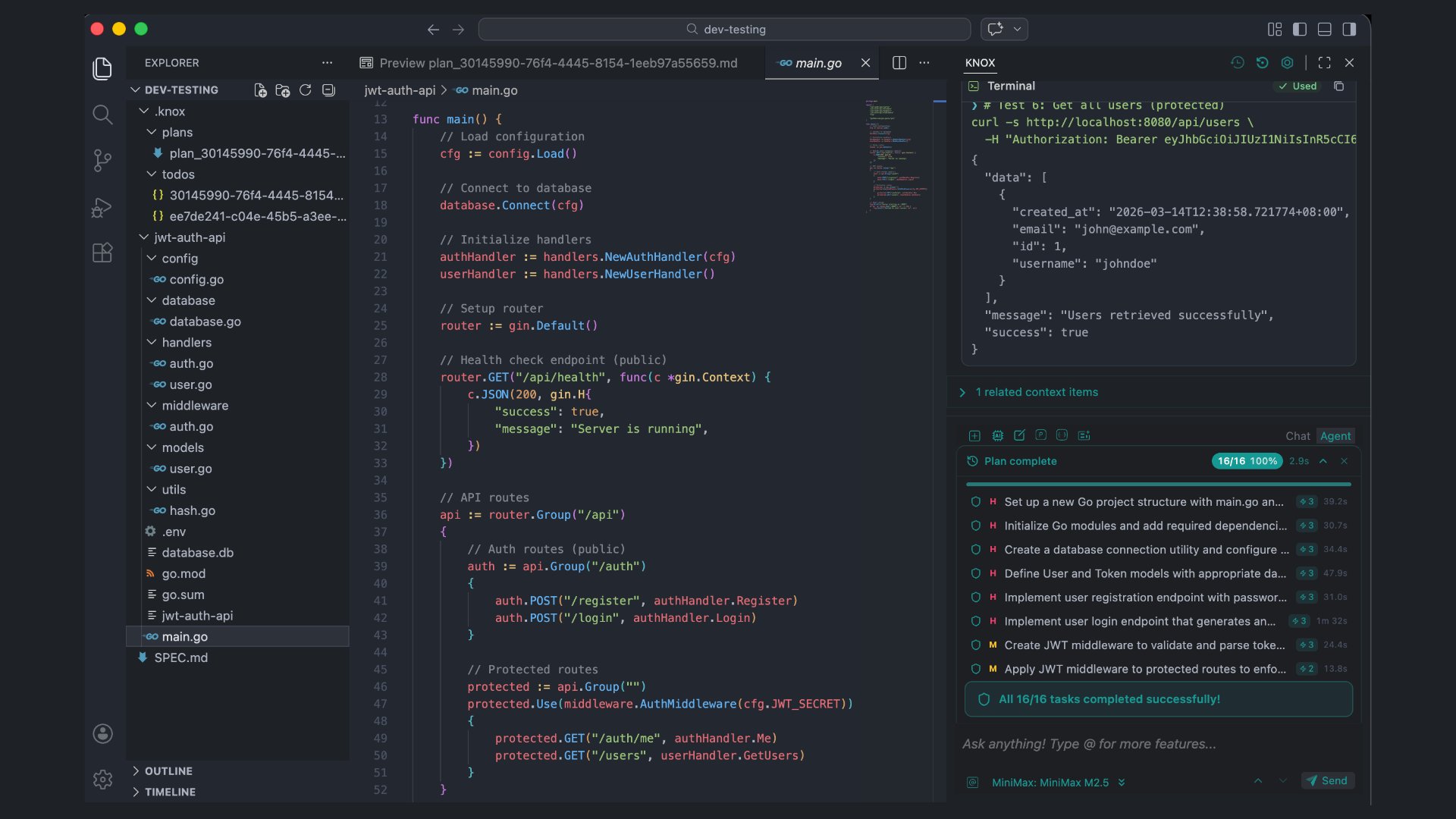
A comprehensive Todo/Task Management System that analyzes complex user requests, breaks them into structured dependency-aware tasks, and tracks progress via tool-call-driven stream synchronization with persistent session management.
 |
|---|
The Problem — Unstructured Task Execution
Previously, complex multi-step requests were handled as monolithic operations:
- No Visibility: Users couldn't see what the AI was working on or what remained
- No Recovery: Failed steps required restarting the entire request
- No Persistence: Progress was lost if the session was interrupted
- No Dependencies: No awareness of task ordering or prerequisites
The Solution — Stream-Sync Task Engine
A complete task orchestration system spanning the VS Code extension backend (TodoManager), the bidirectional protocol layer, Redux state management (todoSlice + planTaskSlice), tool-call-driven stream synchronization (todoStreamSync), and a React GUI (TodoPanel + PlanTaskStatusPanel).
Core Architecture
1. Rich Data Model (core/index.d.ts)
Every task is a TodoItem with 30 fields:
type TodoStatus = "pending" | "in-progress" | "completed" | "failed" | "cancelled" | "blocked";
type TodoPriority = "high" | "medium" | "low";
type TodoComplexity = "simple" | "medium" | "complex";
type TodoCategory = "coding" | "analysis" | "research" | "testing" | "documentation" | "refactoring" | "devops" | "general";

interface TodoItem {
  id: string;
  title: string;
  description: string;
  status: TodoStatus;
  priority: TodoPriority;
  complexity: TodoComplexity;
  category: TodoCategory;
  dependsOn: string[];           // Upstream task IDs
  blockedBy: string[];           // Tasks blocking this one
  filePaths: string[];           // Associated file paths
  toolsNeeded: string[];         // Tools needed (edit_file, run_terminal_cmd, etc.)
  estimatedTimeMs: number;       // Estimated time in milliseconds
  actualTimeMs: number;          // Actual time spent in milliseconds
  retryCount: number;
  maxRetries: number;
  errorMessage?: string;
  resultPreview?: string;        // Human-readable evidence summary
  verified?: boolean;            // true if completion verified by evidence
  evidenceScore?: number;        // 0-1 confidence score
  toolCallCount?: number;        // Number of tool calls that contributed
  subtasks: TodoItem[];          // Recursive nesting
  parentId?: string;             // Parent todo ID (if subtask)
  orderIndex: number;            // Display order
  createdAt: number;
  startedAt?: number;
  completedAt?: number;
  progress: number;              // 0-100
  tags: string[];                // Technology tags (typescript, react, docker, etc.)
}
2. Session Management
Tasks are grouped into TodoSession objects with full lifecycle:
interface TodoSession {
  id: string;
  title: string;
  description: string;
  prompt: string;                          // Original user request
  todos: TodoItem[];
  status: "idle" | "active" | "paused" | "completed" | "failed";
  progress: number;                        // 0-100
  stats: TodoSessionStats;
  config: TodoSessionConfig;
  createdAt: number;
  startedAt?: number;
  completedAt?: number;
  workspaceDirectory?: string;
  conversationId?: string;
}
Statistics — 11 aggregate counters including verifiedTodos:
interface TodoSessionStats {
  totalTodos: number;
  completedTodos: number;
  verifiedTodos: number;     // Completed todos verified by tool-call evidence
  failedTodos: number;
  cancelledTodos: number;
  inProgressTodos: number;
  pendingTodos: number;
  blockedTodos: number;
  totalEstimatedTimeMs: number;
  totalActualTimeMs: number;
  totalRetries: number;
}
Feature 1: AI-Powered Task Analysis & Decomposition
Automatically analyzes user messages to detect when task decomposition is beneficial, then uses the ReasoningEngine or a local NLP fallback to break them down.
Smart Detection (shouldCreateTodos()):
- Explicit triggers:
/todoor@todoin the message - Pattern matching: 17 regex patterns for complex tasks (full-stack, CRUD, REST API, CI/CD, auth, GraphQL, microservice, architecture, migration, database schema, component library, testing framework, etc.)
- Multi-clause detection: Messages with 3+ clauses separated by commas, semicolons,
and, orthen(each >10 chars) - Threshold: 2+ pattern matches triggers creation
AI Analysis (via ReasoningEngine.performTaskAnalysis()):
User: "Build a REST API with authentication, add unit tests, and set up Docker deployment"

AI Analysis Result:
├── Todo 1: Set up Express.js REST API scaffold     [high, coding, simple]
├── Todo 2: Implement JWT authentication middleware  [high, coding, medium]
├── Todo 3: Create CRUD endpoints                   [medium, coding, medium]
├── Todo 4: Write unit tests with Jest              [medium, testing, medium]  → depends on [1,2,3]
└── Todo 5: Create Dockerfile and docker-compose    [low, devops, simple]     → depends on [1]
Local Fallback Analysis (performLocalAnalysis()):
- Sentence boundary splitting (
. ; and then, then) - Comma splitting fallback for single-sentence inputs
- Automatic category inference via 8 keyword dictionaries (coding, analysis, research, testing, documentation, refactoring, devops, general)
- Complexity:
simple(≤2 steps),medium(3–5),complex(>5) - Priority assignment: first third = high, middle = medium, last third = low
- File path extraction via regex (
/path/to/file.ext) - Technology tag detection: TypeScript, JavaScript, React, Node.js, Python, Rust, API, Database, UI, CSS, HTML, Docker
- Tool inference from action verbs:
create→edit_file,test→run_terminal_cmd,search→grep_search/codebase_search,install→run_terminal_cmd,delete→delete_file,list→list_dir
Plan Generation:
For complex tasks (>2 steps), the system generates a structured implementation plan via ReasoningEngine.generateImplementationPlan() and writes it to .knox/plans/plan_{sessionId}.md. Plan steps have status markers (❌ → 🔄 → ✅) that update as todos progress.
Feature 2: Sequential Stream-Sync Execution Engine
Tasks execute one at a time in the stream-sync model. The GUI's todoStreamSync drives advancement — the backend TodoManager.processNextTodos() only marks the next ready todo as in-progress (max 1 concurrent).
Dependency Resolution:
[Task A] ──→ [Task C] ──→ [Task E]
[Task B] ──→ [Task D] ──┘

• Tasks execute sequentially (1 at a time)
• Task B starts only after Task A completes
• Dependency-blocked tasks transition: blocked → pending when upstream completes
Key Mechanisms:
processNextTodos(): Picks the first ready todo (pending + deps met) and marks itin-progress. Only 1 allowed at a time.areDependenciesMet(): Checks alldependsOntodos arecompletedorcancelledunblockDependentTodos(): Transitionsblocked→pendingwhen a dependency resolves; clearsblockedByreferencesgetReadyTodos(): Returns pending todos with all dependencies satisfiedadvanceToNextTodo(): Called from GUI stream-sync; completes current in-progress todo, triggersprocessNextTodos()- AbortController: Clean cancellation of in-progress executions on pause/cancel
Execution Model (Stream-Sync):
todoStreamSync.ts (GUI)                        TodoManager.ts (IDE)
────────────────────                           ─────────────────────
onStreamStart()
  ├─ Build tracker state
  ├─ dispatch(startTodoSession)  ──────────→   startSession()
  │                                              └─ processNextTodos() → mark first todo in-progress
  │
onToolCallEvent() × N
  ├─ Count tool calls on current task
  ├─ Collect affected file paths
  ├─ If toolCallCount ≥ 3 (AUTO_ADVANCE):
  │   dispatch(completeTodo)     ──────────→   completeTodo() → unblock deps → processNextTodos()
  │
onStreamEnd() [wrapperDepth === 0 only]
  ├─ Complete ALL remaining tasks
  └─ dispatch(completeTodo) for each  ─────→   completeTodo() → checkSessionCompletion()
Feature 3: Auto-Retry with Backoff
Failed tasks are automatically retried with increasing delays.
Configuration:
retryOnFailure: Toggle auto-retry (default:true)maxRetries: Maximum retry attempts per task (default:2)
Backoff Formula: 1000 × retryCount ms
- 1st retry: 1 second delay
- 2nd retry: 2 second delay
Behavior:
- If retries remain: Reset status to
pending, incrementretryCount, schedule retry after backoff - If retries exhausted: Mark as permanently
failedwitherrorMessage, still process next todos - Manual retry: Available via UI button, increments
retryCount, resets status topending
Feature 4: Persistent Session Storage
Sessions are automatically saved to disk and survive editor restarts.
Storage Layout:
.knox/
├── todos/
│   ├── {sessionId}.json         # Full session + all todos (JSON)
│   └── ...
└── plans/
    ├── plan_{sessionId}.md      # Implementation plan (Markdown)
    └── ...
Features:
- Auto-save timer: Configurable interval per session (default 30s), via
setInterval - Event-triggered saves: After
persistSession()calls on state changes - Atomic writes: Via
vscode.workspace.fs.writeFileAPI - Load on startup:
loadPersistedSessions()reads all.jsonfiles from.knox/todos/ - Session deletion: Removes both in-memory map entry and on-disk JSON file
Feature 5: Real-Time Progress Tracking UI
Two React panels with live updates, integrated into the chat interface.
Primary Panel — TodoPanel.tsx (9 sub-components):
| Component | Purpose |
|---|---|
StatusIcon | Status indicator with animated spinner, checkmark, alert, lock; shows verification shield + evidence score |
CategoryIcon | 7 category-specific icons: Code2, Lightbulb, Globe, FlaskConical, FileText, Wrench, Sparkles |
PriorityBadge | Color-coded pill — H (red), M (yellow), L (gray) |
ProgressBar | Animated horizontal bar with CSS width transitions |
TodoItemRow | Recursive row with depth-based indentation, expandable subtasks, retry/skip actions |
SessionStatusLine | Status dot + label + completion count + percentage |
SessionStatsFooter | Completed, verified, failed, skipped, retries, total elapsed time |
ActionButton | Reusable themed button component |
TodoPanel | Main container — collapsed/expanded states, session create form, action buttons |
Secondary Panel — PlanTaskStatusPanel.tsx:
- Unified streaming progress panel merging Knox MS task metadata and todo progress
TodoTaskRowsub-component renders individual todo items with status icons and tool call counts- Falls back to todo-based task list when Knox MS tasks are empty
- Shows
todoCurrentTitlefromplanTaskSliceduring streaming
Uses 29 Lucide React icons including Shield, Zap, CheckCircle2, Loader2, Lock, AlertTriangle, Code2, FlaskConical, Globe, FileText, Wrench, Sparkles, Lightbulb, etc.
Panel States:
Collapsed:  [Todo Progress ▼] [75%] ████████░░
Expanded:   Status • 3/4 completed • 75% with full task list, actions, stats
No Session: Create form with prompt input
Feature 6: Bidirectional Protocol Layer
Fully typed message passing between the VS Code extension and React webview, defined in core/protocol/.
IDE → Webview (5 messages) — ToWebviewFromIdeOrCoreProtocol:
| Message | Payload | Purpose |
|---|---|---|
todo/sessionCreated | { session: TodoSession } | New session notification |
todo/sessionUpdated | { session: TodoSession } | Session state change |
todo/sessionCompleted | { session: TodoSession } | Session finished |
todo/todoUpdated | { sessionId, todo: TodoItem } | Individual task update |
todo/progressUpdate | { sessionId, progress, stats } | Progress tick |
Webview → IDE (13 messages) — ToIdeFromWebviewProtocol:
| Message | Payload → Response | Purpose |
|---|---|---|
todo/createSession | { prompt, config? } → { session } | Create from description |
todo/startSession | { sessionId } → { success } | Begin execution |
todo/pauseSession | { sessionId } → { success } | Pause active session |
todo/resumeSession | { sessionId } → { success } | Resume paused session |
todo/cancelSession | { sessionId } → { success } | Cancel with cleanup |
todo/retryTodo | { sessionId, todoId } → { success } | Retry a failed task |
todo/skipTodo | { sessionId, todoId } → { success } | Skip a blocked/failed task |
todo/completeTodo | { sessionId, todoId, resultPreview? } → { success } | Complete a task (stream-sync) |
todo/advanceSession | { sessionId } → { success } | Advance to next todo (stream end) |
todo/getSession | { sessionId } → { session } | Fetch session by ID |
todo/getCurrentSession | undefined → { session } | Fetch active session |
todo/listSessions | undefined → { sessions[] } | List all sessions |
todo/deleteSession | { sessionId } → { success } | Delete session + disk data |
Feature 7: Redux State Management
Two Redux Toolkit slices with 12 async thunks covering complete session lifecycle.
todoSlice State:
interface TodoState {
  currentSession: TodoSession | null;
  sessions: TodoSession[];
  isPanelVisible: boolean;
  isPanelCollapsed: boolean;
  isLoading: boolean;
  error: string | null;
  autoCreateEnabled: boolean;
  viewingSessionId: string | null;
}
12 Async Thunks: createTodoSession, startTodoSession, pauseTodoSession, resumeTodoSession, cancelTodoSession, retryTodo, skipTodo, completeTodo, advanceSession, fetchCurrentSession, fetchAllSessions, deleteTodoSession
12 Synchronous Reducers: sessionCreated, sessionUpdated, sessionCompleted, todoUpdated, progressUpdated, togglePanelVisible, togglePanelCollapsed, setPanelCollapsed, setPanelVisible, toggleAutoCreate, setViewingSession, clearError
planTaskSlice Integration:
The planTaskSlice tracks streaming metadata (Knox MS + todo sync) with fields:
hasTodoSync,todoSessionId,todoCurrentIndex,todoCompletedCount- Updated by
todoStreamSyncviasyncTodoProgressaction
Auto-Reset: Todo state resets when a new chat session begins via newSession extra reducer.
Feature 8: Session Configuration
8 tunable parameters per session (TodoSessionConfig):
| Parameter | Default | Description |
|---|---|---|
maxConcurrentTodos | 3 | Max concurrent slots (currently 1 enforced by stream-sync) |
autoStartNextTodo | true | Auto-start next task on completion |
showProgressNotifications | true | VS Code notification popups |
autoSaveInterval | 30000 | Persistence timer interval (ms) |
retryOnFailure | true | Retry failed tasks automatically |
maxRetries | 2 | Max retry attempts per task |
autoGenerateSubtasks | true | Auto-generate subtasks for complex todos |
analyzeDependencies | true | Run dependency analysis (chains tasks sequentially) |
Feature 9: Internationalization (i18n)
Full multilingual support with 107 translation keys across English and Chinese.
Extension (extensions/vscode/src/i18n/locales/en/todo.json): 43 keys covering session lifecycle, task operations, status messages, plan approval, verification rounds
GUI (gui/src/locales/en/todo.json): 64 keys covering panel UI, status labels, action buttons, statistics, empty states, tooltips, verification badges, difficulty levels
Languages: English (en) + Chinese (zh)
Feature 10: VS Code Command Registration
18 commands registered via vscode.commands.registerCommand in TodoManager.registerCommands():
| Category | Commands |
|---|---|
| Session CRUD | knox.todo.createSession, knox.todo.startSession, knox.todo.pauseSession, knox.todo.resumeSession, knox.todo.cancelSession, knox.todo.deleteSession |
| Todo Operations | knox.todo.retryTodo, knox.todo.skipTodo |
| Query | knox.todo.getCurrentSession, knox.todo.getSession, knox.todo.listSessions |
| Plan Workflow | knox.todo.approvePlan, knox.todo.rejectPlan, knox.todo.getPlan |
| Interactive | knox.todo.createInteractive — Command palette input box → session creation → optional immediate start |
Feature 11: Tool-Call-Driven Progress Tracking (todoStreamSync)
Design Principles:
- Tool calls = progress. Each tool call advances the current task's count. After enough calls, the task is marked done.
- Sequential model. The AI works through tasks in order. A
currentIndexpointer advances forward. - No premature completion. Tasks only complete when enough tool calls accumulate OR the entire conversation ends (outermost wrapper exit at
wrapperDepth === 0). - Every completed task gets the shield icon. No "low evidence" vs "verified" distinction at the tracker level.
Architecture:
callTool.ts          todoStreamSync.ts              TodoManager.ts
───────────         ──────────────────             ──────────────────
ToolCallEvent ──→   onToolCallEvent()
                      ├─ Count on current task
                      ├─ Collect file paths
                      ├─ If count ≥ 3 (AUTO_ADVANCE_THRESHOLD):
                      │   completeCurrentAndAdvance()
                      │     └─ dispatch(completeTodo) ──────→  completeTodo()
                      │                                          ├─ Parse verification metadata
                      │                                          ├─ Update plan file (🔄 → ✅)
                      │                                          ├─ Unblock dependents
                      │                                          └─ processNextTodos()
                      │
                      └─ emitProgress() → syncTodoProgress   planTaskSlice
                                           (Redux action)       → PlanTaskStatusPanel (UI)
                                                                → TodoPanel (UI)
Tracker State:
interface TrackerState {
  sessionId: string;
  todos: TodoEntry[];      // { id, title, completed, toolCallCount, files, chars }
  currentIndex: number;
  totalToolCalls: number;
  totalChars: number;
  finished: boolean;
  roundCount: number;
}
Key Constants:
AUTO_ADVANCE_THRESHOLD = 3— Tool calls needed to auto-advance to next task
Wrapper Depth Tracking:
onWrapperEnter()/onWrapperExit()manage awrapperDepthcounter- Stream end reconciliation (
onStreamEnd()) only fires atwrapperDepth === 0 - Intermediate tool-call rounds (depth > 0) are no-ops
Session Initialization:
- If session exists in Redux and is
idle→ init tracker + start backend session - If session is
active→ attach tracker without re-starting - If no session → poll every 200ms for up to 8 seconds, then give up
- Early tool calls and chunks are buffered until tracker initializes
Stream End Behavior:
- At outermost exit: complete ALL remaining tasks unconditionally
- Each remaining task gets
dispatch(completeTodo)with a result preview (e.g., "Completed with N tool call(s), M file(s)") - Completion summary dispatched via
setCompletionSummary
Verification Metadata Parsing (TodoManager):
When completeTodo() receives a resultPreview string, parseVerificationMetadata() extracts:
verified:trueif preview contains[verified],Verified:,text verified, or[tool-evidence]evidenceScore: Extracted fromscore: N%,evidence: N%,keyword match: N%, or(N%); defaults to 0.8 if verified, 0 otherwisetoolCallCount: Extracted fromN tool callpattern
UI Indicators:
- Shield icon (🛡 cyan): Verified completion with tool call evidence
- Checkmark (✓): Standard completion
- Warning (⚠ yellow): Low-evidence completion — may need review
- Zap badge (⚡N): Tool call count indicator
- Percentage badge: Evidence score for low-confidence items
- Result preview tooltip: Full evidence summary on hover