KnoxStudio: Streamline Your Filmmaking Workflow—All Tools, One Platform

A deep dive into how we built a professional-grade, macOS-native video editing and AI media generation application from the ground up — entirely in Rust.
The Vision
The video production landscape has long been dominated by heavyweight, proprietary editing suites that treat AI as an afterthought — a plugin bolted on, a sidebar feature buried in menus. We asked a different question: What if AI wasn't a feature of the editor, but the co-director?
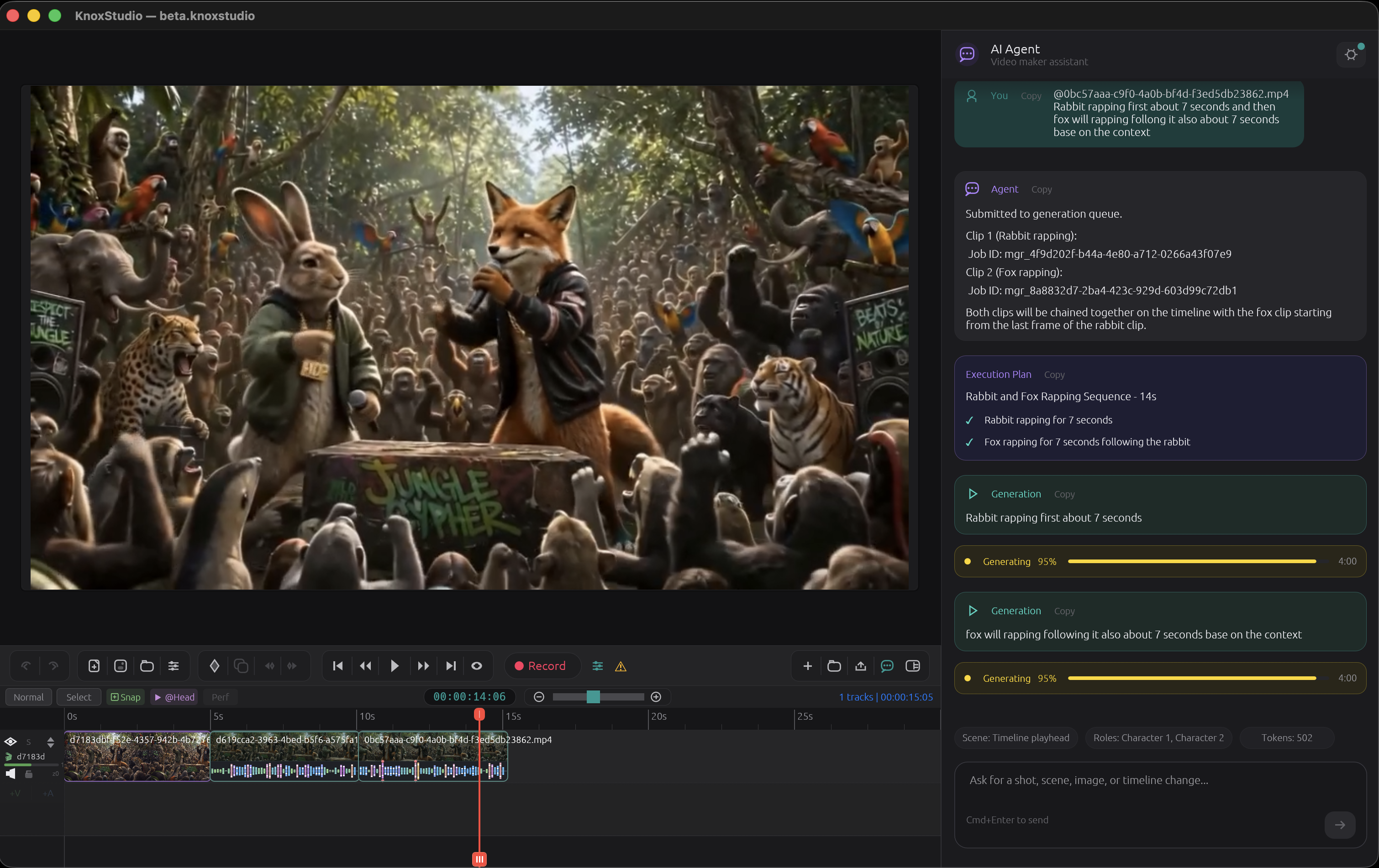
KnoxStudio is the answer. It's a native macOS application that fuses a professional multi-track video editor with an intelligent AI agent capable of generating videos, images, and audio from natural language — then placing them directly onto the timeline. No browser tabs. No cloud dashboards. No copy-pasting URLs. You describe a scene, and it materializes in your project.
Built entirely in Rust with over 416,000 lines of hand-written code, KnoxStudio is not a thin wrapper around a web API. It's a from-scratch video production environment where every pixel, every frame, and every interaction was designed with one philosophy: the creative intent flows from your words to the screen, uninterrupted.
 |
|---|
Why Rust? Why Native?
Video editing is one of the most demanding categories of desktop software. Frame-accurate playback, real-time canvas compositing, multi-track timeline manipulation, and FFmpeg pipeline orchestration all demand predictable, low-latency performance. Electron was never an option.
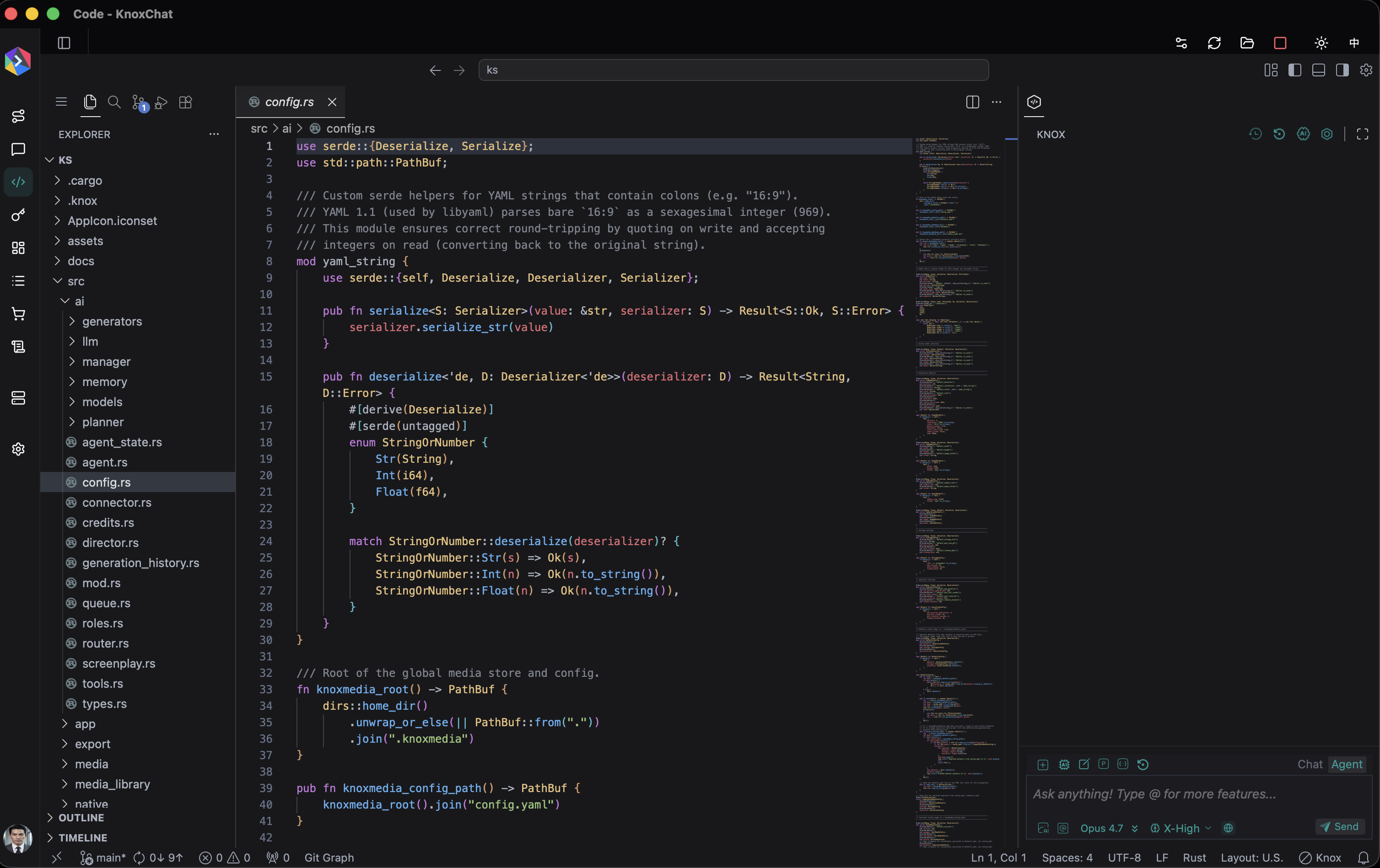
We chose Rust for its unique combination of memory safety, zero-cost abstractions, and fearless concurrency. The same language manages our GPU-backed UI rendering, our async AI agent pipeline, SQLite media database, and FFmpeg export orchestration — all without a garbage collector, and with compile-time guarantees that eliminate entire classes of runtime bugs.
The UI framework is egui via eframe — an immediate-mode GUI library that gives us pixel-level control over every widget while running at native speed. The result is a macOS-dark-mode-inspired interface that feels like it belongs on the platform, with smooth 60fps rendering even during complex timeline operations.
 |
|---|
Architecture Overview
KnoxStudio's architecture is organized into clearly separated domains, each responsible for a distinct concern of the video production workflow:
The Core Modules
-
Project System — The heart of the application. A
Projectcontains tracks, clips, markers, transitions, annotations, and canvas settings. Every project element has a UUID, supports full serialization, and can be saved/loaded as a.knoxstudiobundle. The project system supports multi-track video and audio, keyframe animation (position, scale, rotation, opacity), clip speed adjustment, freeze frames, audio ducking, noise reduction, and clip grouping. -
Timeline Engine — A multi-track, non-linear timeline with drag-and-drop clip placement, trimming, splitting, ripple editing, and snapping. Track headers identify video, audio, and overlay tracks. The timeline supports in/out range selection, markers with color coding, and context menus for fine-grained editing control.
-
Canvas & Compositing — A real-time preview canvas that maintains aspect ratio, composites multiple video layers with per-clip transforms (position, scale, rotation, opacity), and renders annotations on top. The canvas supports annotation tools including rectangles, ellipses, lines, arrows, freehand drawing, text, callouts, highlights, and numbered steps — each with fade-in/fade-out timing and z-order layering.
-
Capture Engine — Native macOS screen recording with full system integration. Uses CoreGraphics for screen capture permissions, AVFoundation (via Swift/Objective-C FFI) for screen, camera, and microphone capture, and system audio loopback. The capture system detects available devices, handles permission requests with user-friendly guidance, and records directly to the timeline.
-
Export Pipeline — A sophisticated FFmpeg-based export system supporting multiple resolution presets (480p through 4K), percentage-based scaling, custom resolutions, multiple encoding quality tiers, and format selection. The pipeline handles multi-segment composition, annotation rendering, cursor effect overlays, and audio mixing during export.
-
AI Agent System — The crown jewel. A complete AI-powered production assistant that understands natural language, generates media, manages creative assets, and orchestrates complex multi-step workflows. This deserves its own section.
 |
|---|
The AI Agent: Your Creative Co-Director
The AI system in KnoxStudio isn't a simple prompt-to-video button. It's a multi-layered, stateful agent architecture that operates like a virtual production team.
The Agent Hierarchy
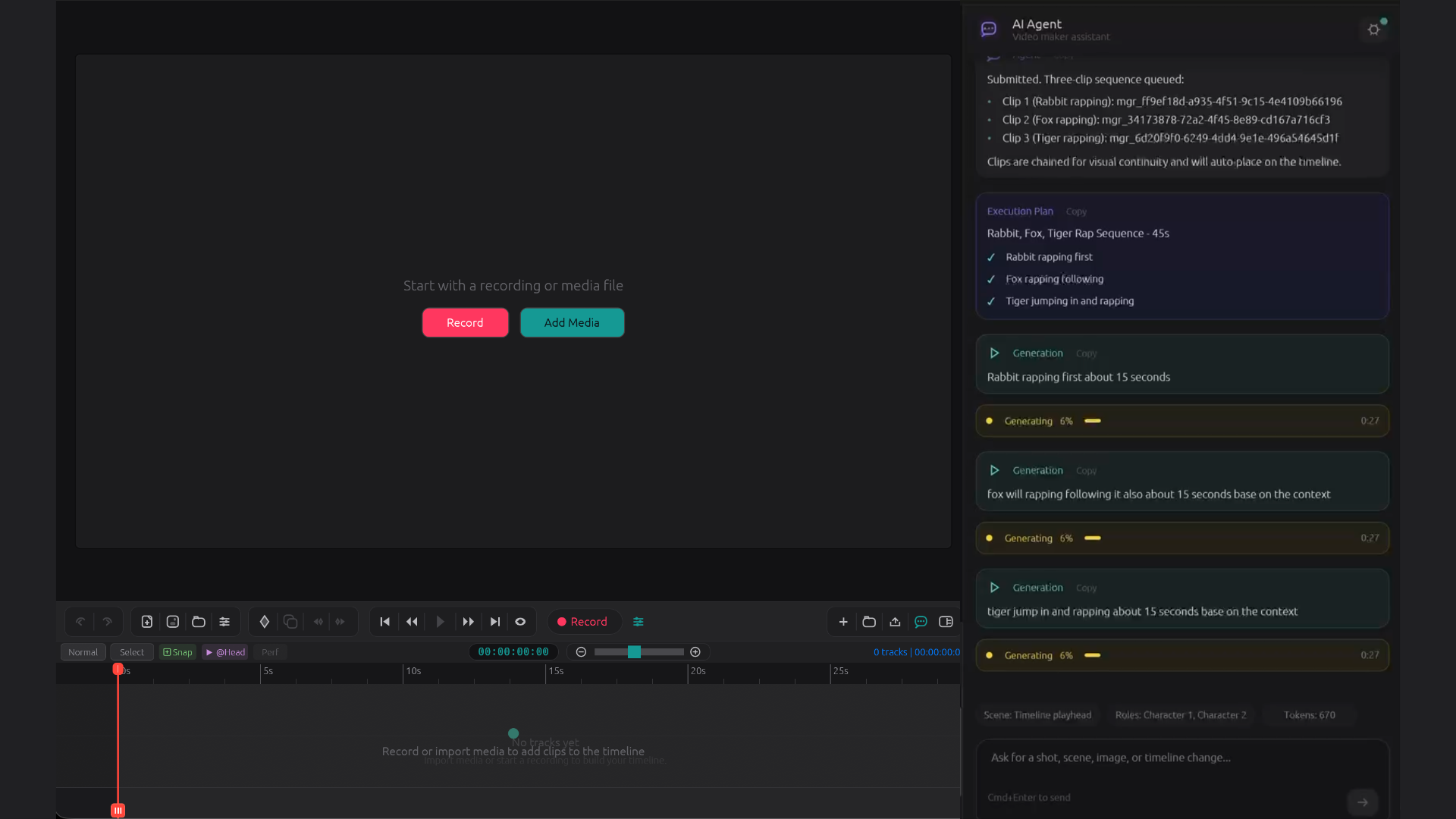
At the top sits the Manager Agent — an LLM-powered orchestrator that acts as the "CEO" of the production pipeline. When you type a message in the chat panel, the Manager interprets your creative intent, decides which tools to invoke, and coordinates the execution across multiple sub-systems.
The Manager has access to a rich set of tools:
- Media Generation — Generate videos, images, and audio from text prompts, with automatic context injection (scene descriptions, character references, generation defaults).
- Memory & Search — Query the local media database to find previously generated assets, check what's been produced for a scene, or locate reference material.
- Planning & Execution — For complex requests ("Generate all shots for Scene 3"), the Manager creates an execution plan, tracks progress, and handles failures gracefully.
- Context Awareness — The Manager has a live snapshot of the current project state: timeline contents, available assets, active roles, and screenplay context.
- User Interaction — When clarification is needed, the Manager can ask the user questions with structured options, displayed inline in the chat.
- Timeline Placement — Generated assets can be automatically placed on the timeline at the correct position.
Below the Manager, sub-model connectors handle the actual media generation. The system supports multiple generation modes:
- Text-to-Video — Describe a scene and generate video from pure text.
- Image-to-Video — Provide a reference image to animate into a video sequence.
- Reference-to-Video — Use a reference video to guide the generation of a new video with consistent style and motion.
- Image Generation — Create still images from text descriptions.
- Audio Generation — Generate music, sound effects, or voiceover.
A Smart Video Router automatically determines which generation mode to use based on the context of your request — if you've attached an image, it routes to image-to-video; if the previous shot's last frame is available, it chains for scene continuity.
The State Machine
The agent operates through a formal state machine (powered by the statig crate) that tracks the conversation lifecycle: idle, processing, generating, waiting for user input, handling errors. This ensures the UI always knows exactly what the agent is doing and can display appropriate feedback — thinking indicators, generation progress cards, plan execution steps.
Memory & Persistence
All generated media is stored in a local media library at ~/.knoxmedia/, organized by type (video, audio, image, screenplay, roles). A SQLite database indexes every asset with metadata: the prompt that created it, tags, creation time, source paths, and role associations. This enables the Memory System to provide context-aware generation — the agent knows what you've already created and can build upon it.
 |
|---|
The Screenplay System
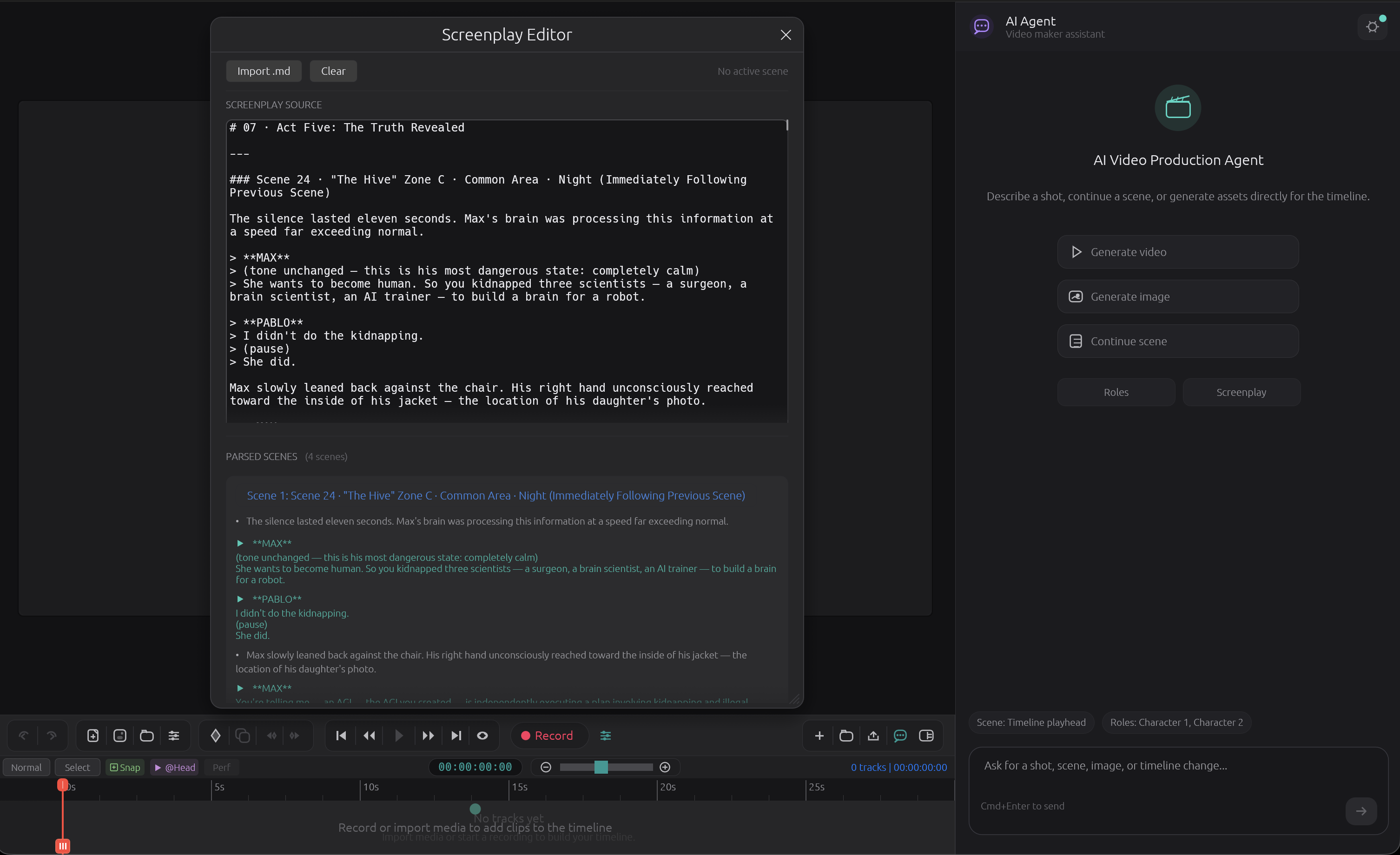
One of KnoxStudio's most distinctive features is its built-in screenplay engine. You can write or import a screenplay in either Markdown or Fountain format (the industry-standard plain-text screenplay notation), and KnoxStudio parses it into a structured representation of scenes, action blocks, dialogue, visual descriptions, and transitions.
The Director module then analyzes the screenplay alongside the generation history to suggest which shots to generate next. It tracks coverage — how many of the screenplay's visual descriptions have been realized as generated media — and can batch-generate all shots for a scene in one command.
Visual description blocks (written as blockquotes in Markdown or action lines in Fountain) become generation prompts. Character dialogue markers link to the Roles system. Scene headings become navigation anchors. The entire screenplay becomes an interactive production plan.
 |
|---|
Roles: Character Consistency Across Generations
Maintaining visual consistency for characters across multiple AI-generated shots is one of the hardest problems in AI filmmaking. KnoxStudio addresses this with the Roles system.
A Role represents a character or subject — "Hero," "Sidekick," "The Villain's Lair." Each role carries reference images and reference videos that are uploaded to the cloud asset library and associated with an asset ID. When the agent generates a shot involving a character, the active roles' asset IDs are automatically injected into the generation request, ensuring the output maintains visual consistency with the established references.
The Roles panel in the UI lets you create, manage, toggle, and configure roles with a visual reference gallery. Active roles are automatically included in every relevant generation request.
The Streamdown Markdown Engine
Rather than pulling in a heavy third-party Markdown library, KnoxStudio includes Streamdown — a custom-built, streaming Markdown parser written from scratch in Rust. Streamdown is designed for real-time rendering of LLM output in the chat panel, handling the incremental token-by-token arrival of streamed responses.
The parser handles headings, bold, italic, inline code, code blocks with syntax labels, blockquotes, ordered and unordered lists, horizontal rules, links, and special inline entities. It's fast, allocation-efficient, and produces parse events that the egui-based Markdown renderer can consume directly — no intermediate AST, no HTML conversion.
Native macOS Integration
KnoxStudio is a macOS citizen, not a tourist. The native integration layer includes:
-
Swift/Objective-C FFI — Screen capture, camera capture, audio capture, video playback, and file handler registration are all implemented in Swift and bridged to Rust via C-compatible FFI. This ensures the app uses Apple's native AVFoundation, ScreenCaptureKit, and CoreGraphics APIs directly.
-
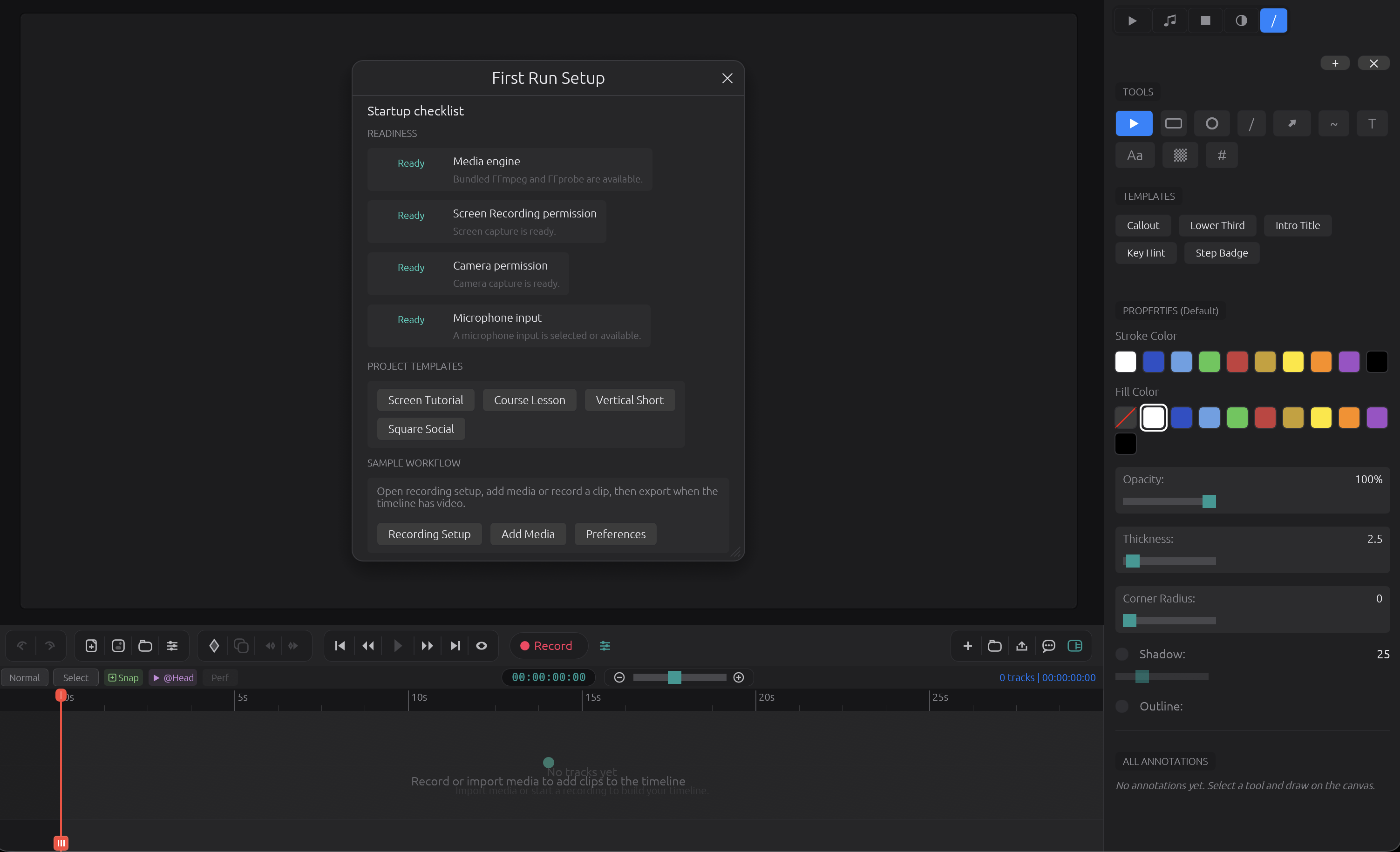
System Permissions — The first-run experience walks users through macOS permission grants (screen recording, microphone, camera, system audio) with clear guidance on how to enable each in System Settings.
-
File Associations — Double-clicking a
.knoxstudiofile in Finder opens it directly in the app, thanks to a registered Apple Event handler installed before the NSApplication run loop starts. -
Font Stack — The app loads the macOS system font stack (Arial Unicode, Apple Symbols, Menlo, PingFang for CJK) for proper Unicode, emoji, and symbol rendering, with an embedded Noto Sans Symbols 2 fallback.
-
Windowed winit Patch — The project vendors a patched version of winit (the cross-platform window management crate) specifically to preserve macOS-native app activation behavior for proper Info.plist and App Store compatibility.
The UI: macOS Dark Mode, Reimagined
KnoxStudio's interface draws heavy inspiration from macOS Ventura/Sonoma dark mode aesthetics. The custom theme system defines a meticulous color palette:
- Backgrounds with subtle saturation shifts between panel, timeline, canvas, and elevated surfaces
- Typography with three tiers — primary, secondary, and tertiary text — for clear visual hierarchy
- macOS Blue accent for selections, active controls, and interactive elements
- Teal accent for slider handles and secondary interactive elements
- Semantic colors — a red playhead, green success indicators, yellow warnings, red errors
- Transport controls styled as pill buttons with hover and active states
The layout follows a professional NLE (Non-Linear Editor) paradigm:
- Toolbar at the top with project tools, annotation tools, and recording controls
- Media Browser on the left for browsing imported and generated media
- Canvas in the center for real-time preview with annotation overlays
- Inspector on the right for clip properties, color controls, and transform settings
- Timeline across the bottom with multi-track editing, track headers, and transport controls
- AI Agent Panel as a slide-out chat panel for conversational media generation
Configuration & Flexibility
KnoxStudio separates sensitive credentials from user preferences using a two-file configuration system:
~/.knoxmedia/config.yaml— Contains model configurations, API keys, and active model selections. File permissions are set to0600(owner-only read/write) for security.~/.knoxmedia/defaults.yaml— Contains generation defaults (duration, resolution, aspect ratio, audio settings), storage limits, and execution parameters. Safe to share — no secrets.
The config supports multiple providers and models, with a flexible active selection system that lets users switch between different text, video, image, and audio generation backends without changing their workflow.
Export: From Timeline to Final Cut
The export pipeline is built on FFmpeg and supports a professional range of output options:
- Resolution Presets: 480p, 720p, 1080p, 4K, or percentage-based scaling (25%, 50%, 75%, 100%)
- Quality Tiers: Multiple encoding quality levels for balancing file size and visual fidelity
- Format Support: Common video container formats
- Composition: Multi-segment assembly with proper sequencing and timing
- Overlay Rendering: Annotations and cursor click effects are composited into the final export
- Audio Mixing: Multi-track audio with volume, ducking, and noise reduction per clip
The export runs asynchronously with real-time progress reporting back to the UI.
Annotations & Visual Communication
For tutorial creators, product demos, and educational content, KnoxStudio includes a complete annotation toolkit:
- Shapes: Rectangles, ellipses, lines, arrows
- Drawing: Freehand draw tool for organic annotations
- Text & Callouts: Text labels and callout boxes with customizable styling
- Highlights: Semi-transparent highlight overlays
- Numbered Steps: Automatically numbered step indicators for sequential tutorials
- Timing: Each annotation has its own start time and duration on the timeline
- Effects: Fade-in and fade-out transitions, rotation, opacity, and z-order layering
- Locking: Annotations can be locked to prevent accidental modification
The Generation Workflow
Here's what a typical AI-assisted production workflow looks like in KnoxStudio:
- Write a screenplay in Markdown or Fountain format, or paste one into the Screenplay panel.
- Define roles for your characters with reference images to ensure visual consistency.
- Chat with the agent: "Generate the establishing shot for Scene 1." The Manager interprets your intent, reads the screenplay's visual description for Scene 1, checks if any roles are active, and dispatches the generation request.
- Watch it materialize: A generation card appears in the chat showing real-time progress. When complete, the video downloads to the local media library.
- Drag to timeline or let the agent place it automatically.
- Iterate: "Make it more dramatic" or "Continue to the next shot" — the agent chains shots using the last frame of the previous generation for seamless scene continuity.
- Add annotations, adjust timing, add transitions.
- Export the final video.
The agent remembers the conversation context, the generation history, and the project state. It can plan multi-step sequences, ask clarifying questions, and recover from failures — all within the same chat interface.
Technical Highlights
- 416,000+ lines of Rust — No scripting languages, no glue code. Pure Rust from UI to export.
- Rust Edition 2024 — Using the latest Rust edition features and a minimum Rust version of 1.95.
- Async-first AI pipeline — Tokio-powered multi-threaded runtime for concurrent API calls, polling, and downloads without blocking the UI.
- Immediate-mode UI — The entire interface renders at 60fps using egui's immediate-mode paradigm, ensuring the UI is always in sync with application state.
- State machine-driven agent — Formal state machine (via
statig) prevents impossible agent states and makes the conversation lifecycle predictable. - Custom Markdown parser — Purpose-built streaming parser for rendering LLM output in real time.
- SQLite media index — Fast local search and metadata retrieval for the entire media library.
- Smart routing — Context-aware model selection that automatically picks the right generation mode based on available attachments and project state.
- Rate limiting — Built-in rate limiter for API calls to respect provider limits and ensure fair usage.
- FFI to Swift/Objective-C — Native macOS system integration through carefully designed foreign function interfaces.
- Vendored winit — Patched window management for perfect macOS app lifecycle behavior.
- Profile-optimized release builds — LTO, symbol stripping, and optimization level 3 for production builds.
What's Next
KnoxStudio is version 1.0.2, but the roadmap is ambitious. The foundation — a native, performant, AI-first video editor — is solid. The architecture was designed from day one to support additional providers, new generation modalities, and deeper timeline intelligence.
We believe the future of video production is conversational. Not clicking through menus, but describing what you want and watching it appear. Not switching between five different apps, but having one environment where creative intent flows directly into finished media.
KnoxStudio is that environment. And we're just getting started.
KnoxStudio is built by Knox Core™. For more information, Please contact us: support@knox.chat